5 Expert Tips for a Better Revit Library
If you use Autodesk Revit regularly, you know how quickly your family collection can grow. A few doors, windows, furniture items, plumbing fixtures, lighting fixtures, equipment, and annotation symbols can soon become hundreds or even thousands of files. Without a proper system, finding the right family when you need it can take more time than actually using it.
That is where 5 Expert Tips for a Better Revit Library can make a real difference. A well-organized Revit family library is not simply about keeping folders neat. It can help you find content faster, avoid duplicate families, maintain consistent project standards, and create a smoother BIM workflow.
Whether you are an architect, BIM modeler, MEP engineer, contractor, student, or experienced Revit professional, 5 Expert Tips for a Better Revit Library can help you build a collection that is easier to manage and more useful for your everyday projects.
One of the biggest advantages of following 5 Expert Tips for a Better Revit Library is the amount of time you can save. Instead of searching through countless folders or downloading the same family repeatedly, you can quickly locate reliable content that is already organized and ready to use.
If you regularly download Revit families from different websites, receive content from clients, or create your own custom families, having a clear system becomes even more important. Applying 5 Expert Tips for a Better Revit Library can help you decide which families should stay, which should be archived, and how everything should be categorized.
A professional family library should also grow with your experience. As you complete more projects, you will discover which families you use most often and which ones are rarely needed. The 5 Expert Tips for a Better Revit Library provide a practical foundation for turning that growing collection into a reliable resource.
In this guide, we will explore 5 Expert Tips for a Better Revit Library, including folder organization, consistent naming, removing duplicate content, adding useful information, and keeping your library updated.
By putting these ideas into practice, you can spend less time searching for Revit families and more time focusing on modeling, design, coordination, and delivering high-quality projects.
Why Your Revit Family Library Matters
Before discussing the 5 Expert Tips for a Better Revit Library, it is important to understand why organization matters so much.
Imagine that you are working on a commercial project and need a specific wall-mounted sink. You know that you downloaded one several months ago, but you have no idea where it is saved. You search through multiple folders and find five similar files with unclear names.
Instead of spending a few seconds loading a family, you spend ten or fifteen minutes searching.
Now multiply that time across hundreds of projects.
A professional library solves this problem by giving every family a logical location, consistent naming system, and clear classification.
A good library should allow you to answer three questions quickly:
- What family do I need?
- Where is it located?
- Is this the correct version?
That is the foundation of 5 Expert Tips for a Better Revit Library.
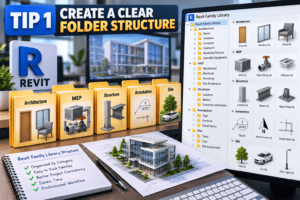
Tip 1: Create a Clear Folder Structure
The first step in building a professional Revit library is creating a folder structure that makes sense.
One of the biggest mistakes users make is storing every family in a single folder. While this may seem convenient at first, it becomes extremely difficult to manage as the library grows.
Organize Families by Category
A simple structure could look like this:
- Architecture
- Doors
- Windows
- Furniture
- Casework
- Plumbing Fixtures
- Specialty Equipment
- MEP
- Mechanical
- Electrical
- Plumbing
- Fire Protection
- Structure
- Columns
- Beams
- Structural Connections
- Annotation
- Tags
- Symbols
- Detail Items
- Site
- Trees
- Cars
- Site Equipment
This approach makes your library easier to navigate and is one of the most practical parts of 5 Expert Tips for a Better Revit Library.
You can also create separate folders for manufacturer-specific content. For example, if you frequently work with commercial projects, you might create folders for HVAC equipment, lighting manufacturers, plumbing manufacturers, and other suppliers.
The important thing is consistency. Once you choose a structure, use it across your entire library.
Tip 2: Use Consistent Family Names
A good folder structure is helpful, but it will not solve everything if your family names are confusing.
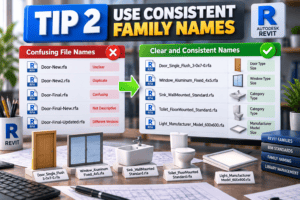
For example, imagine finding files named:
Door-New.rfa
Door-New2.rfa
Door-Final.rfa
Door-Final-New.rfa
Door-Final-Updated.rfa
These names tell you very little.
Instead, use a naming system that describes the family clearly.
A Simple Naming Convention
For example:
Door_Single_Flush_3-0x7-0
Window_Aluminum_Fixed_4x5
Sink_WallMounted_Standard
Toilet_FloorMounted_Standard
You can also include manufacturer names or model numbers when necessary.
For example:
Light_Manufacturer_Model_600x600
The goal is to make the filename useful even before you load the family.
This is another important part of 5 Expert Tips for a Better Revit Library because clear names make searching much faster.
Avoid unnecessary words such as “final,” “new,” “latest,” or “updated.” If you have multiple versions, use a controlled version system instead.
Tip 3: Remove Duplicate and Unused Families
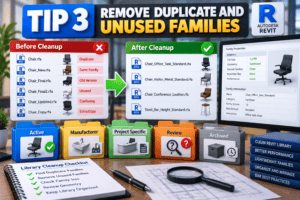
Over time, Revit libraries naturally become cluttered.
You may download the same family from several websites, receive families from clients, or create multiple versions while working on different projects. Eventually, you may have several nearly identical families.
This creates confusion.
A good cleanup process is therefore one of the most useful 5 Expert Tips for a Better Revit Library.
Perform a Regular Library Cleanup
Create a temporary folder called something like:
_Review
Whenever you are unsure whether a family should remain in your main library, move it there instead of immediately deleting it.
After a few weeks, check whether you actually needed those files.
You can also separate families into:
- Active
- Archived
- Manufacturer
- Project Specific
- Review
Project-specific families should generally stay separate from your main reusable library.
For example, if a client provides a custom reception desk family that will only be used for one project, there may be little reason to place it inside your permanent furniture library.
This prevents your main collection from becoming overloaded with one-off content.
Watch Out for Heavy Families
Not all Revit families are created equally.
Some families contain excessive geometry, unnecessary nested components, complicated formulas, large imported CAD files, or high-resolution 3D objects. These can increase model size and affect project performance.
Before adding a family permanently, open it in the Family Editor and inspect its geometry.
A clean and lightweight family is usually more useful than an extremely detailed family that slows down your project.
Tip 4: Add Useful Metadata and Preview Images
One of the easiest ways to make a large library easier to use is by adding information that helps you identify families quickly.
This is especially useful if you have hundreds of similar objects.
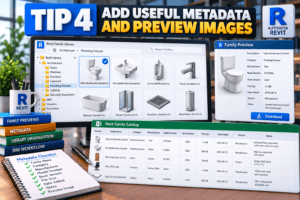
Create Family Preview Images
A simple preview image can tell you what a family looks like without opening it.
For example, your library can contain:
Toilet_FloorMounted_Standard.rfa
with a preview image showing the actual object.
This small step can save significant time when you are searching through a large collection.
You can also maintain a spreadsheet or catalog containing information such as:
- Family name
- Category
- Manufacturer
- Model number
- Revit version
- File size
- Date added
- Notes
- Source
These details become extremely valuable as your collection grows.
For BIM professionals managing thousands of files, this is one of the most important 5 Expert Tips for a Better Revit Library.
If you publish Revit families on your own website, you can take this idea even further by organizing families into categories with preview images, descriptions, compatibility information, and download options.
That makes the library useful not only for you but also for other Revit users.
Tip 5: Keep Your Library Updated
A Revit family library should not be treated as a folder that you organize once and forget.
Revit changes over time. Projects change. Manufacturers update their products. BIM standards evolve. Your own modeling standards also improve.
That is why regular maintenance is the final part of 5 Expert Tips for a Better Revit Library.
Review Your Library Regularly
You do not need to spend an entire weekend cleaning your library every month.
Instead, make small improvements whenever you have time.
For example:
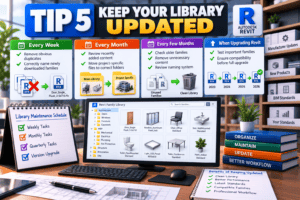
Every week:
Remove obvious duplicates and correctly name newly downloaded families.
Every month:
Review recently added content and move project-specific files to their appropriate folders.
Every few months:
Check older families, remove unnecessary content, and review your naming system.
When upgrading Revit:
Test important families before moving your entire library to a new Revit version.
This simple maintenance routine can prevent your library from becoming chaotic again.
Build a Personal Revit Family Collection
Once you understand 5 Expert Tips for a Better Revit Library, you can start building a collection specifically for the type of projects you work on.
For example, an architectural Revit modeler may frequently need:
- Doors
- Windows
- Furniture
- Casework
- Appliances
- Plumbing fixtures
- Lighting
- Ceiling components
- Annotation symbols
An MEP modeler may need a completely different collection:
- Air terminals
- Mechanical equipment
- Pumps
- Pipes and fittings
- Plumbing fixtures
- Electrical equipment
- Lighting fixtures
- Panels
- Devices
Do not try to collect every family available online.
Instead, focus on families that you actually use.
A smaller, high-quality collection can be much more valuable than a massive folder containing thousands of random files.
Create a “Favorite Families” Folder
Here is another simple technique that can dramatically improve your workflow.
Create a folder called:
00_Favorite_Families
Place your most frequently used families there.
For example, if you regularly work on retail projects, you might keep your standard doors, toilets, sinks, lighting fixtures, equipment, furniture, and other frequently used objects in this folder.
This creates a quick-access library without changing the organization of your main collection.
As your workflow develops, your favorite folder can become a highly efficient starting point for every new project.
Keep Project Families Separate
One common library problem is mixing reusable families with project-specific content.
Suppose you receive a custom family from a client for one specific building. If you save it alongside your standard families, you may accidentally use it in another project later.
Create a separate folder such as:
Project_Specific
Then create subfolders for individual projects.
For example:
Project_Specific > Client_A > Project_001
This is a simple but powerful way to protect the quality of your main library and is closely related to 5 Expert Tips for a Better Revit Library.
Backup Your Revit Library
Imagine spending years building a valuable collection of Revit families and then losing everything because of a hard-drive failure. A well-organized library is useful only if you can keep it safe and recover it when something goes wrong. That is why 5 Expert Tips for a Better Revit Library should always include a reliable backup strategy.
Keeping a backup of 5 Expert Tips for a Better Revit Library resources can protect your work from accidental deletion, hardware failure, corrupted files, or unexpected computer problems. Ideally, keep at least one additional copy of your important Revit families in a separate location.
You can use several backup options, including:
- External hard drives or SSDs
- Network storage
- Cloud storage
- A dedicated backup drive
When managing 5 Expert Tips for a Better Revit Library, avoid making changes to several separate copies without a clear system. You could accidentally edit one version while continuing to use another, creating confusion about which files are current.
A better approach is to maintain one master Revit family library and use your other locations strictly as backups. This makes 5 Expert Tips for a Better Revit Library easier to manage because you always know which collection is your primary source.
You can also create regular backup schedules. For example, back up newly added families weekly and perform a complete library backup once a month. This simple habit can make 5 Expert Tips for a Better Revit Library much safer and more reliable over the long term.
A master library combined with controlled backups gives you greater peace of mind. If your computer fails, you can restore your Revit families without rebuilding your collection from scratch.
Final Thoughts
A professional Revit family library is not about having the largest number of files. It is about having the right families organized in the right way, so you can find what you need quickly and use it with confidence. The 5 Expert Tips for a Better Revit Library can help you turn a messy collection of files into a practical and efficient resource for your daily projects.
Here are the key points to remember:
- Create a clear and logical folder structure.
- Use consistent and descriptive family names.
- Remove duplicate, outdated, and unnecessary families.
- Add preview images and useful family information.
- Review and maintain your library regularly.
Following these 5 Expert Tips for a Better Revit Library can make a noticeable difference in your everyday BIM workflow. Instead of wasting time searching through hundreds of files, you can quickly locate the family you need and get back to modeling.
A well-organized library can also improve project consistency. When you use reliable, tested families instead of downloading random content every time you start a project, you have better control over the quality of your models. This is one of the practical benefits of applying the 5 Expert Tips for a Better Revit Library.
Whether you are an architect, BIM modeler, MEP engineer, contractor, student, or Revit enthusiast, investing time in your family library is worth it. Start small by organizing the categories you use most often, such as doors, windows, furniture, plumbing fixtures, lighting, or mechanical equipment.
You can also create a dedicated collection of your favorite and most frequently used families. This makes it much easier to begin new projects without repeatedly searching online for the same content. A structured approach like this is at the heart of the 5 Expert Tips for a Better Revit Library.
If you regularly download Revit families from online sources, remember to check their quality before adding them permanently to your collection. Look for unnecessary geometry, imported CAD files, excessive parameters, and other elements that could make your project unnecessarily heavy. Keeping only useful and well-built families will make your library more valuable over time.
For users who want to save even more modeling time, a reliable online Revit family library can also be a valuable resource. Instead of creating common objects from scratch, you can find a suitable family, review its details, download it, and continue working. This approach complements the 5 Expert Tips for a Better Revit Library by combining good organization with easy access to useful BIM content.
Ultimately, 5 Expert Tips for a Better Revit Library are about making your workflow faster, cleaner, and more consistent. You do not need to organize everything in one day. Start with one category, remove unnecessary files, rename the useful ones, and create a folder structure that fits your projects.
Once you make library organization part of your regular workflow, managing hundreds or even thousands of Revit families becomes much easier. The 5 Expert Tips for a Better Revit Library give you a simple foundation, but the real results come from applying these practices consistently.
Start organizing your Revit family collection today. A few hours of organization now can save you many hours of searching later—and give you more time to focus on what really matters: designing, modeling, and delivering better projects.
For more information click here.