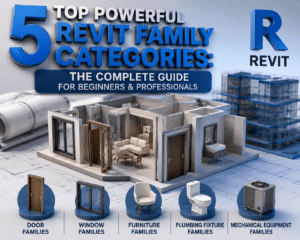
5 Top Powerful Revit Family Categories: The Complete Guide for Beginners & Professionals
Introduction
If you want to master Autodesk Revit, one of the most important concepts you must understand is 5 Top Powerful Revit Family Categories. Whether you are a beginner starting your BIM journey or an experienced Revit professional working on commercial, residential, or industrial projects, knowing the 5 Top Powerful Revit Family Categories can dramatically improve your workflow, project organization, and productivity.
Every Revit model is built using families. These families define how building components behave, appear, and interact inside your project. Without a proper understanding of family categories, creating an efficient BIM model becomes difficult.
In this comprehensive guide, we will explore the 5 Top Powerful Revit Family Categories, explain their importance, discuss where they are used, and provide practical tips that both beginners and advanced users can apply immediately.
By the end of this article, you’ll understand why mastering the 5 Top Powerful Revit Family Categories is one of the smartest investments you can make in your Revit career.
Why Revit Family Categories Matter
Before discussing the 5 Top Powerful Revit Family Categories, let’s understand what a Revit Family Category actually is.
A Family Category determines:
- Object behavior
- Visibility settings
- Scheduling capabilities
- Material assignment
- Host requirements
- Tagging options
- Graphic representation
Every object inside Revit belongs to a specific category. When categories are used correctly, your BIM model becomes cleaner, faster, and easier to manage.
Learning the 5 Top Powerful Revit Family Categories helps you:
- Create organized BIM models
- Improve project performance
- Reduce modelling errors
- Generate accurate schedules
- Collaborate efficiently with project teams
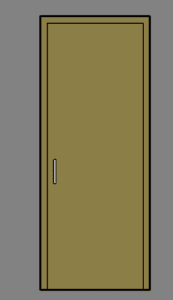
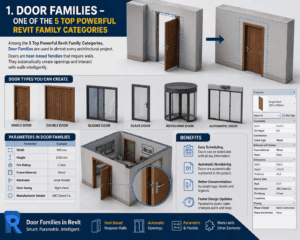
1. Door Families – One of the 5 Top Powerful Revit Family Categories
Among the 5 Top Powerful Revit Family Categories, Door Families are used in almost every architectural project.
Doors are host-based families that require walls. They automatically create openings and interact with walls intelligently.
Why Door Families Are Powerful
Door Families allow users to:
- Create single doors
- Double doors
- Sliding doors
- Glass doors
- Revolving doors
- Automatic doors
Each family can contain parameters like:
- Width
- Height
- Fire rating
- Frame material
- Hardware
- Door swing
- Manufacturer details
Benefits
- Easy scheduling
- Automatic numbering
- Better documentation
- Faster design updates
This is why Door Families remain one of the 5 Top Powerful Revit Family Categories every BIM professional should master.
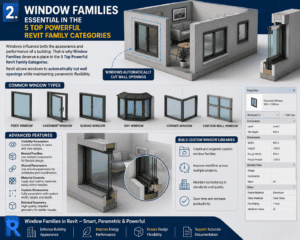
2. Window Families – Essential in the 5 Top Powerful Revit Family Categories
Windows influence both the appearance and performance of a building. That is why Window Families deserve a place in the 5 Top Powerful Revit Family Categories.
Revit allows windows to automatically cut wall openings while maintaining parametric flexibility.
Common Window Types
You can create:
- Fixed windows
- Casement windows
- Sliding windows
- Bay windows
- Corner windows
- Curtain wall windows
Advanced Features
Window Families support:
- Visibility parameters
- Nested families
- Shared parameters
- Material controls
- Custom dimensions
- Detailed geometry
Professional BIM modelers often build custom window libraries to improve workflow across multiple projects.
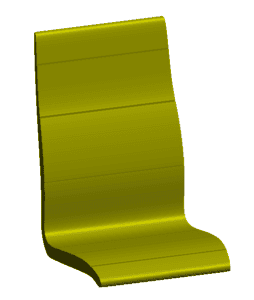
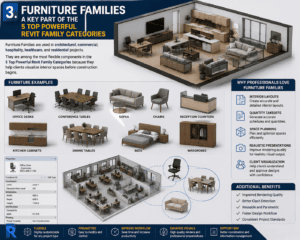
3. Furniture Families – A Key Part of the 5 Top Powerful Revit Family Categories
Furniture Families are used in architectural, commercial, hospitality, healthcare, and residential projects.
They are among the most flexible components in the 5 Top Powerful Revit Family Categories because they help clients visualize interior spaces before construction begins.
Furniture Examples
Furniture Families include:
- Office desks
- Conference tables
- Sofas
- Chairs
- Reception counters
- Kitchen cabinets
- Dining tables
- Beds
- Wardrobes
Why Professionals Love Furniture Families
Furniture Families provide:
- Interior layouts
- Quantity takeoffs
- Space planning
- Realistic presentations
- Client visualization
Well-built furniture families also improve rendering quality and clash detection.
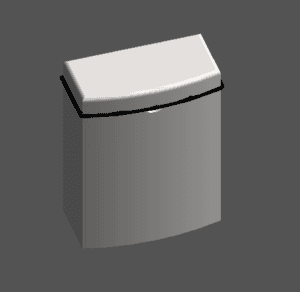
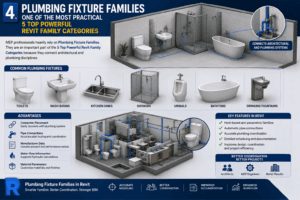
4. Plumbing Fixture Families – One of the Most Practical 5 Top Powerful Revit Family Categories
MEP professionals heavily rely on Plumbing Fixture Families.
They are an important part of the 5 Top Powerful Revit Family Categories because they connect architectural and plumbing disciplines.
Common Plumbing Fixtures
Examples include:
- Toilets
- Wash basins
- Kitchen sinks
- Showers
- Urinals
- Bathtubs
- Drinking fountains
Advantages
These families include:
- Connector placement
- Pipe connections
- Manufacturer data
- Water flow information
- Material parameters
Using proper plumbing fixture families improves coordination between architects and MEP engineers.
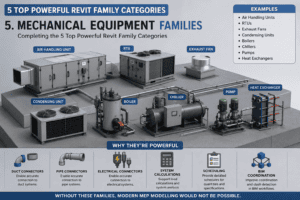
5. Mechanical Equipment Families – Completing the 5 Top Powerful Revit Family Categories
Mechanical Equipment Families are among the most advanced components in Revit.
Every HVAC project depends on these intelligent families.
This is why Mechanical Equipment completes the 5 Top Powerful Revit Family Categories.
Examples
Mechanical Equipment includes:
- Air Handling Units
- RTUs
- Exhaust Fans
- Condensing Units
- Boilers
- Chillers
- Pumps
- Heat Exchangers
Why They’re Powerful
Mechanical equipment families support:
- Duct connectors
- Pipe connectors
- Electrical connectors
- System calculations
- Scheduling
- BIM coordination
Without these families, modern MEP modelling would not be possible.
Tips to Master the 5 Top Powerful Revit Family Categories
Whether you’re a beginner or an advanced user, these tips will help you work smarter.
Use Parameters Effectively
Instead of creating multiple versions of the same family, use parameters to control:
- Width
- Height
- Visibility
- Materials
- Types
Keep Families Lightweight
Avoid unnecessary geometry.
Smaller families improve:
- Loading speed
- Model performance
- Project stability
Follow Naming Standards
Use consistent naming like:
- Door_Single_900x2100
- Chair_Office_TypeA
- Window_Casement_1200x1500
This keeps your library organised.
Test Before Using
Always test families inside a sample project before importing them into production models.
Common Mistakes to Avoid
Even experienced users make mistakes while creating families.
Avoid these common problems:
Overcomplicated Geometry
Too much detail slows down projects.
Missing Parameters
Families without parameters become difficult to edit later.
Incorrect Category Selection
Choosing the wrong category affects schedules, tags, and visibility.
Ignoring Reference Planes
Reference planes ensure predictable family behaviour.
Why Every BIM Professional Should Learn the 5 Top Powerful Revit Family Categories
Companies worldwide are adopting BIM standards faster than ever.
Professionals who understand the 5 Top Powerful Revit Family Categories can:
- Build smarter models
- Deliver projects faster
- Reduce errors
- Improve documentation
- Increase productivity
- Enhance BIM coordination
- Earn better career opportunities
Whether you’re designing houses, hospitals, airports, shopping malls, hotels, or industrial facilities, these categories form the foundation of every successful Revit project.
Best Practices for Building Revit Family Libraries
A high-quality family library saves countless hours during project execution.
Some recommended practices include:
- Keep file sizes small.
- Add clear type names.
- Include manufacturer information where needed.
- Use shared parameters for scheduling.
- Create reusable templates.
- Maintain consistent materials.
- Test families after every update.
- Store libraries in organised folders.
- Remove unused geometry.
- Update libraries regularly.
These practices ensure your projects remain efficient and professional.
Conclusion
Understanding the 5 Top Powerful Revit Family Categories is one of the fastest ways to become a more efficient Revit user. From doors and windows to furniture, plumbing fixtures, and mechanical equipment, each category plays a vital role in creating accurate, intelligent, and coordinated BIM models.
Beginners benefit by learning the foundations of family creation and project organisation, while experienced professionals can streamline workflows, improve documentation, and enhance collaboration across architectural, structural, and MEP disciplines. Investing time in mastering these categories will not only improve your daily productivity but also strengthen your long-term BIM expertise.
If your goal is to build cleaner models, reduce project errors, and deliver high-quality BIM projects with confidence, start by mastering these 5 Top Powerful Revit Family Categories. They are the building blocks of every successful Revit project and an essential skill for anyone serious about advancing their career in Building Information Modeling.
For more information click here.