7 Powerful Revit Family Naming Standards
A well-organized Revit project is not just about creating accurate models. It is also about making sure that every family, type, view, sheet, and parameter can be easily understood by everyone working on the project. This becomes especially important when multiple BIM professionals are working on the same model.
One of the easiest ways to improve BIM project organization is by following consistent family naming rules. The 7 Powerful Revit Family Naming Standards discussed in this guide can help BIM teams create cleaner models, reduce confusion, speed up coordination, and make projects easier to maintain.
Whether you are a Revit beginner, BIM modeler, architect, engineer, or BIM manager, having a reliable naming system can save hours of unnecessary work.
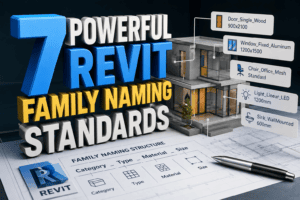
Why Revit Family Naming Matters
Imagine opening a Revit project containing hundreds or thousands of families. You see names such as:
- Door-New-01
- Door-New-Final
- Door-New-Final-2
- Door-New-Final-Revised
- Door-New-Final-Use-This
This type of naming may seem harmless when one person is working on a project. However, it quickly becomes a problem when an entire BIM team is involved.
A good naming system makes families easier to search, identify, schedule, filter, and replace. The 7 Powerful Revit Family Naming Standards provide a practical approach to solving these common problems.
A properly named family should tell the user what the family represents without requiring them to open it and investigate its parameters.
For example:
Door_Single_Wood_900x2100
is much easier to understand than:
Door-01-Final
The first name provides useful information immediately.
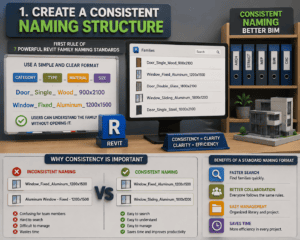
1. Create a Consistent Naming Structure
The first rule among the 7 Powerful Revit Family Naming Standards is consistency.
Your BIM team should decide on a naming structure before a project begins. Once the structure is established, everyone should follow the same format.
A simple structure could be:
Category_Type_Material_Size
For example:
Door_Single_Wood_900x2100
or:
Window_Fixed_Aluminum_1200x1500
This approach allows users to understand the family without opening it.
Why Consistency Is Important
Imagine that one BIM modeler names a family:
Window_Fixed_Aluminum_1200x1500
while another uses:
Aluminum Window – Fixed – 1200×1500
Both names may be understandable, but they are inconsistent. When hundreds of families are involved, inconsistent naming becomes difficult to manage.
A standard naming format also makes searching much faster.
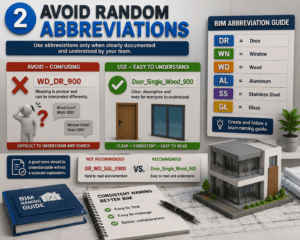
2. Avoid Random Abbreviations
Abbreviations can save space, but they can also create confusion.
For example:
WD_DR_900
might mean “wood door 900 mm” to one person. Another team member may interpret it differently.
One of the most useful ideas within the 7 Powerful Revit Family Naming Standards is to use abbreviations only when they are clearly documented and universally understood by your team.
If you decide to use abbreviations, create a BIM naming guide.
For example:
- DR = Door
- WN = Window
- WD = Wood
- AL = Aluminum
- SS = Stainless Steel
- GL = Glass
However, avoid creating complicated abbreviations that new team members will struggle to understand.
Keep Names Easy to Read
A good family name should be understandable without a separate explanation whenever possible.
Instead of:
DR_WD_SGL_0900
consider:
Door_Single_Wood_900
The second version is longer but much easier to understand.
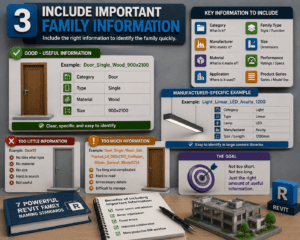
3. Include Important Family Information
The third principle in the 7 Powerful Revit Family Naming Standards is to include information that actually helps users identify the family.
You do not need to put every parameter into the family name. Instead, include the information that is important for identification.
Depending on the family, useful information may include:
- Category
- Family type
- Manufacturer
- Model number
- Material
- Size
- Performance rating
- Application
- Product series
For example:
Door_Single_Wood_900x2100
provides category, style, material, and size.
For manufacturer-specific content, you might use:
Light_Linear_LED_Acuity_1200
This makes the family easier to identify when working with a large content library.
The goal of the 7 Powerful Revit Family Naming Standards is not to make names unnecessarily long. The goal is to make them useful.
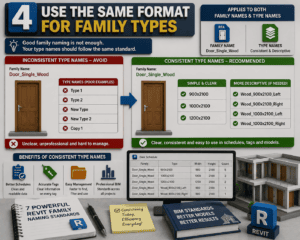
4. Use the Same Format for Family Types
Many Revit users focus on family names but forget about type names.
This can create another layer of confusion.
For example, a family could be named:
Door_Single_Wood
but its types might be:
- Type 1
- Type 2
- New Type
- New Type 2
- Copy 1
This defeats the purpose of having a good family naming system.
The 7 Powerful Revit Family Naming Standards should therefore apply to both family names and type names.
Create Descriptive Type Names
A better approach could be:
900×2100
1000×2100
1200×2100
Or, if more information is required:
Wood_900x2100_Left
Wood_900x2100_Right
This makes schedules, tags, and model management much easier.
5. Separate Manufacturer Families Clearly
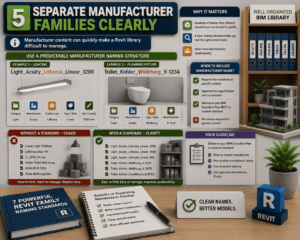
Manufacturer content can quickly make a Revit library difficult to manage.
A BIM team may have hundreds of families from different manufacturers. Without a standard system, it becomes difficult to identify which manufacturer a family belongs to.
The 7 Powerful Revit Family Naming Standards recommend using a predictable manufacturer naming structure when manufacturer information is important.
For example:
Light_Acuity_Lithonia_Linear_1200
or:
Toilet_Kohler_WallHung_K-1234
This provides useful information without forcing users to open the family.
However, not every project requires the manufacturer name in every family. Your BIM Execution Plan or content standard should define when manufacturer information is required.
6. Avoid Words Like “Final” and “New”
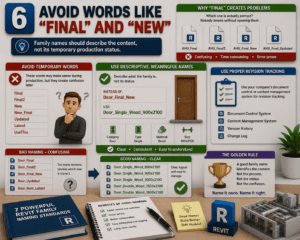
One of the most common BIM content problems is using temporary words in permanent family names.
Examples include:
Final
Final2
New
New_Final
Updated
Latest
UseThis
These names may make sense during production, but they become confusing after the project has been running for several months.
A key lesson from the 7 Powerful Revit Family Naming Standards is that family names should describe the content, not its temporary production status.
Instead of:
Door_Final_New
use:
Door_Single_Wood_900x2100
If the family needs revision tracking, use your company’s document control or content management system rather than adding random words to the family name.
Why “Final” Creates Problems
Suppose you have:
AHU_Final
AHU_Final2
AHU_Final_New
AHU_Final_Updated
Which one is actually correct?
Nobody knows without opening them.
A good naming standard eliminates this problem.
7. Build a Company-Wide Revit Naming Standard
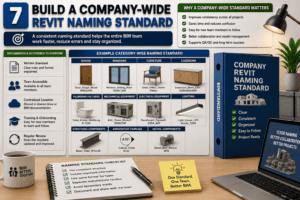
The final principle among the 7 Powerful Revit Family Naming Standards is to create a standard that the entire BIM team can follow.
A naming standard should not exist only in the head of the BIM manager.
It should be documented and available to everyone.
Your BIM standard could include examples for:
- Doors
- Windows
- Furniture
- Casework
- Plumbing fixtures
- Mechanical equipment
- Electrical equipment
- Lighting
- Structural components
- Annotation families
- Detail components
The more clearly the standard is documented, the easier it becomes for new team members to follow it.
How to Create Your Own Naming Guide
Creating a naming guide does not have to be complicated.
Start with the most frequently used categories in your projects.
For example:
Architectural Families
Door_Single_Wood_900x2100
Window_Fixed_Aluminum_1200x1500
Furniture_Desk_1200x600
MEP Families
Mechanical_AHU_5000CFM
Plumbing_Sink_WallMounted
Electrical_Panel_1200A
Annotation Families
Tag_Door_Standard
Tag_Window_Standard
Detail_Component_FireRating
These examples give modelers a clear starting point.
Naming Standards Improve BIM Coordination
Good naming is not simply an administrative task. It directly affects BIM coordination.
When architects, structural engineers, MEP engineers, contractors, and consultants exchange models, everyone needs to understand the content.
The 7 Powerful Revit Family Naming Standards make this communication easier because family names provide useful context.
A clearly named family can also make clash investigation and model review faster.
For example, if a coordination issue involves:
Mechanical_RTU_Rooftop_15000CFM
the team immediately knows what equipment is involved.
Compare that with:
RTU-01
The second name requires additional investigation.
Better Naming Makes Schedules Easier
Revit schedules are another area where good naming standards provide major benefits.
When family and type names are structured correctly, schedules become easier to read and filter.
For example, a door schedule containing:
Door_Single_Wood_900x2100
Door_Single_Wood_1000x2100
Door_Double_Glass_1800x2100
is much easier to understand than one containing:
D01
D02
D03
The 7 Powerful Revit Family Naming Standards therefore support not only model organization but also documentation quality.
Naming Standards Save Time
BIM professionals often underestimate how much time is lost searching for content.
If a team member spends only a few minutes searching for a family several times a day, that wasted time can become significant over an entire project.
Clear naming reduces unnecessary searching.
Instead of browsing through folders and opening multiple files, a modeler can type a keyword into the Revit Family browser and quickly locate the correct content.
This is one of the simplest productivity improvements a BIM team can make.
Common Revit Naming Mistakes to Avoid
Even experienced Revit users sometimes make naming mistakes.
Here are some of the most common:
- Using inconsistent capitalization
- Mixing spaces, hyphens, and underscores
- Creating unexplained abbreviations
- Using “Final” in family names
- Using “New” for permanent content
- Giving types generic names
- Including unnecessary information
- Creating extremely long names
- Using different naming systems for different projects
- Failing to document the standard
The 7 Powerful Revit Family Naming Standards are designed to prevent these problems before they become difficult to fix.
A Practical Naming Template
If your BIM team needs a simple starting point, consider this structure:
Category_Type_Manufacturer_Material_Size
For example:
Door_Single_Wood_900x2100
Window_Fixed_Aluminum_1200x1500
Sink_WallMounted_Kohler_600
Light_Linear_LED_Acuity_1200
You can modify the structure depending on your company’s requirements.
The important thing is that the structure remains consistent.
Should You Use Underscores or Spaces?
There is no universal answer for every BIM company.
However, many teams prefer underscores because they make names easier to search and maintain.
For example:
Door_Single_Wood_900x2100
is clear and predictable.
Whatever format you choose, document it and use it consistently.
The 7 Powerful Revit Family Naming Standards are most effective when every team member follows the same rules.
BIM Managers Should Lead by Example
A naming standard will not work if the BIM manager ignores it.
BIM managers should ensure that project templates, content libraries, and existing families follow the same naming principles.
Regular content audits can also help.
For example, once a month, your team could review newly created families and check whether they follow the naming standard.
This small process can prevent hundreds of poorly named families from entering the company library.
Final Thoughts
A successful BIM workflow is built on clear and consistent standards, and Revit family naming is one of the simplest areas to improve. The 7 Powerful Revit Family Naming Standards provide BIM teams with a practical way to create organized, searchable, and professional Revit content.
These standards can help your team:
- Create a consistent naming structure.
- Avoid confusing abbreviations.
- Include important family information.
- Maintain consistent family and type names.
- Organize manufacturer-specific content.
- Avoid temporary words such as “Final” and “New.”
- Establish a company-wide Revit naming system.
Good naming may seem like a small detail, but it can make a significant difference in day-to-day productivity. When a project contains hundreds or thousands of Revit families, the 7 Powerful Revit Family Naming Standards can make it much easier to find the right content and reduce unnecessary confusion.
If your BIM team spends too much time searching for families, checking type names, or managing content libraries, it may be time to review your current naming approach. Applying the 7 Powerful Revit Family Naming Standards can help create a more organized and predictable BIM environment.
The best BIM standards do not need to be complicated. They should be clear, practical, repeatable, and easy for every team member to understand. That is why the 7 Powerful Revit Family Naming Standards can be valuable for both small BIM teams and large multidisciplinary projects.
Start with a simple naming structure, document your rules, train your team, and apply the 7 Powerful Revit Family Naming Standards consistently across your projects. Over time, your Revit library will become easier to manage, your models will be more organized, and your overall BIM workflow will become faster and more efficient.
For more information click here.