7 Powerful Quantity Takeoff Using Revit
Introduction
Accurate quantity takeoff is one of the most important parts of any construction project. Whether you are an architect, BIM modeler, quantity surveyor, contractor, or project manager, obtaining reliable material quantities can significantly improve project planning, budgeting, and resource allocation. Traditional quantity takeoff methods often require extensive manual calculations, making them time-consuming and prone to human error.
Modern BIM technology has transformed the way construction professionals perform quantity estimation. Revit, developed by Autodesk, provides powerful tools that allow users to generate accurate quantities directly from intelligent building models. By leveraging BIM workflows, professionals can improve efficiency while reducing costly mistakes.
This guide explores 7 Powerful Quantity Takeoff Using Revit techniques that can help improve project accuracy, save time, and streamline construction documentation.

Why Quantity Takeoff Matters
Quantity takeoff is the process of measuring and calculating materials, components, and quantities required for a construction project. Accurate quantity takeoff helps professionals:
- Prepare precise cost estimates
- Reduce material waste
- Improve procurement planning
- Enhance project scheduling
- Minimize construction risks
- Increase profitability
Using BIM software makes these processes faster and more reliable than traditional manual methods.
Understanding Revit for Quantity Takeoff
Revit is a Building Information Modeling (BIM) platform that stores detailed information about building components. Every wall, door, window, floor, and structural element contains embedded data that can be extracted through schedules and reports.
One of the biggest advantages of 7 Powerful Quantity Takeoff Using Revit workflows is that quantities update automatically whenever the model changes. This dynamic connection helps maintain consistency between design and estimation.
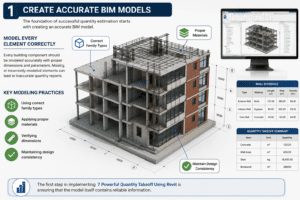
1. Create Accurate BIM Models
The foundation of successful quantity estimation starts with creating an accurate BIM model.
Model Every Element Correctly
Every building component should be modeled accurately with proper dimensions and parameters. Missing or incorrectly modeled elements can lead to inaccurate quantity reports.
Key modeling practices include:
- Using correct family types
- Applying proper materials
- Verifying dimensions
- Maintaining design consistency
The first step in implementing 7 Powerful Quantity Takeoff Using Revit is ensuring that the model itself contains reliable information.
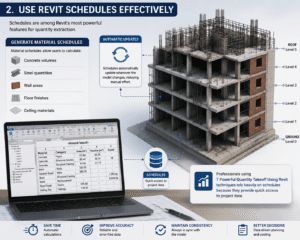
2. Use Revit Schedules Effectively
Schedules are among Revit’s most powerful features for quantity extraction.
Generate Material Schedules
Material schedules allow users to calculate:
- Concrete volumes
- Steel quantities
- Wall areas
- Floor finishes
- Ceiling materials
Schedules automatically update whenever the model changes, reducing manual effort.
Professionals using 7 Powerful Quantity Takeoff Using Revit techniques rely heavily on schedules because they provide quick access to project data.
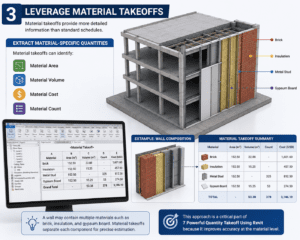
3. Leverage Material Takeoffs
Material takeoffs provide more detailed information than standard schedules.
Extract Material-Specific Quantities
Material takeoffs can identify:
- Material area
- Material volume
- Material cost
- Material count
For example, a wall may contain multiple materials such as brick, insulation, and gypsum board. Material takeoffs separate each component for precise estimation.
This approach is a critical part of 7 Powerful Quantity Takeoff Using Revit because it improves accuracy at the material level.
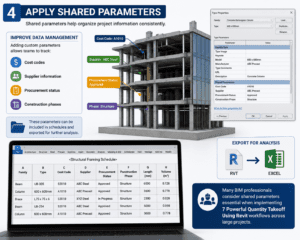
4. Apply Shared Parameters
Shared parameters help organize project information consistently.
Improve Data Management
Adding custom parameters allows teams to track:
- Cost codes
- Supplier information
- Procurement status
- Construction phases
These parameters can be included in schedules and exported for further analysis.
Many BIM professionals consider shared parameters essential when implementing 7 Powerful Quantity Takeoff Using Revit workflows across large projects.
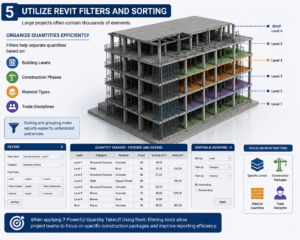
5. Utilize Revit Filters and Sorting
Large projects often contain thousands of elements.
Organize Quantities Efficiently
Filters help separate quantities based on:
- Building levels
- Construction phases
- Material types
- Trade disciplines
Sorting and grouping make reports easier to understand and review.
When applying 7 Powerful Quantity Takeoff Using Revit, filtering tools allow project teams to focus on specific construction packages and improve reporting efficiency.
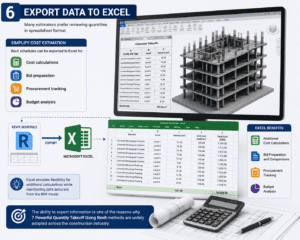
6. Export Data to Excel
Many estimators prefer reviewing quantities in spreadsheet format.
Simplify Cost Estimation
Revit schedules can be exported to Excel for:
- Cost calculations
- Bid preparation
- Procurement tracking
- Budget analysis
Excel provides flexibility for additional calculations while maintaining data accuracy from the BIM model.
The ability to export information is one of the reasons why 7 Powerful Quantity Takeoff Using Revit methods are widely adopted across the construction industry.
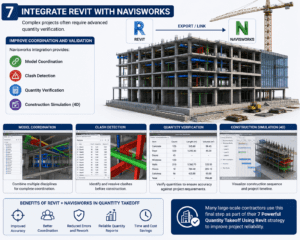
7. Integrate Revit with Navisworks
Complex projects often require advanced quantity verification.
Improve Coordination and Validation
Navisworks integration provides:
- Model coordination
- Clash detection
- Quantity verification
- Construction simulation
Combining Revit and Navisworks helps ensure that quantity reports match actual project requirements.
Many large-scale contractors use this final step as part of their 7 Powerful Quantity Takeoff Using Revit strategy to improve project reliability.
Common Mistakes to Avoid
Even with advanced BIM tools, certain mistakes can impact quantity accuracy.
Incomplete Modeling
Missing components result in incomplete quantity reports.
Incorrect Material Assignments
Wrong material definitions can affect takeoff calculations.
Duplicate Elements
Duplicate objects can inflate quantities and increase estimated costs.
Unverified Schedules
Always review schedules before issuing reports.
Avoiding these errors helps maximize the benefits of 7 Powerful Quantity Takeoff Using Revit techniques.
Benefits of Quantity Takeoff Using Revit
Organizations that adopt BIM-based quantity estimation often experience significant advantages.
Increased Accuracy
Automated calculations reduce manual errors.
Faster Project Delivery
Schedules and reports can be generated within minutes.
Better Cost Control
Accurate quantities support reliable budgeting.
Improved Collaboration
Project stakeholders can access consistent data from a shared model.
Reduced Rework
Automatic updates help prevent inconsistencies between drawings and estimates.
These benefits explain why 7 Powerful Quantity Takeoff Using Revit has become a preferred workflow for modern construction professionals.
Best Practices for Successful Quantity Takeoff
To maximize efficiency, consider the following recommendations:
- Maintain a clean BIM model
- Use standardized naming conventions
- Regularly audit project data
- Verify material assignments
- Update schedules frequently
- Coordinate with all project disciplines
- Review exported reports carefully
Following these best practices will improve the quality and reliability of quantity reports throughout the project lifecycle.
Future of BIM Quantity Takeoff
As BIM technology continues to evolve, quantity takeoff processes will become even more advanced. Artificial intelligence, cloud collaboration, and digital twins are expected to improve project visibility and estimation accuracy.
Construction companies that invest in BIM workflows today will be better positioned to compete in an increasingly data-driven industry. The continued adoption of 7 Powerful Quantity Takeoff Using Revit methods will help organizations achieve greater efficiency, better cost control, and improved project outcomes.
Conclusion
Accurate quantity estimation plays a critical role in construction project success. Revit provides powerful BIM capabilities that simplify quantity extraction while improving accuracy and efficiency. By creating accurate models, using schedules, leveraging material takeoffs, applying shared parameters, utilizing filters, exporting data, and integrating with Navisworks, professionals can transform their estimation workflows.
The 7 Powerful Quantity Takeoff Using Revit techniques discussed in this guide offer practical strategies for improving project planning, budgeting, and execution. As BIM adoption continues to grow, mastering these methods will help architects, engineers, contractors, and BIM professionals deliver higher-quality projects with greater confidence.
For more information click here