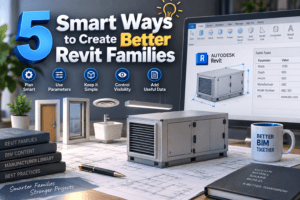
5 Smart Ways to Create Better Revit Families
Creating a Revit family may seem simple at first. You can build the geometry, add a few dimensions, and load it into your project. But creating a family that works reliably across different projects, sizes, views, and documentation requirements is a completely different challenge.
That is where 5 Smart Ways to Create Better Revit Families becomes important. A professional Revit family should do more than look good in a 3D view. It should respond correctly to parameters, display properly in plans and elevations, remain lightweight, and provide useful information to BIM users.
For architects, engineers, BIM modelers, and manufacturers, 5 Smart Ways to Create Better Revit Families offers a practical approach to developing content that is both flexible and easy to use.
A well-designed family can save valuable modeling time, reduce repetitive work, improve project documentation, and minimize errors. Instead of creating multiple versions of the same product, you can build smart content that adapts to different requirements.
The real advantage of 5 Smart Ways to Create Better Revit Families is that it focuses on how families perform in real-world projects, not simply how they appear on screen.
Whether you are developing manufacturer content, building an internal BIM library, or creating custom families for your projects, 5 Smart Ways to Create Better Revit Families can help you make better decisions throughout the modeling process.
From choosing the correct family category to controlling parameters, geometry, visibility, and manufacturer data, 5 Smart Ways to Create Better Revit Families gives you a clear foundation for creating Revit content that users can trust and enjoy working with.
Why Revit Family Quality Matters
Before discussing the techniques, it is worth understanding why family quality matters so much.
A manufacturer family may be downloaded and used by hundreds of designers. If its parameters are confusing, geometry is unnecessarily heavy, or the family behaves poorly at different sizes, users may stop using it.
On the other hand, a clean family feels almost invisible. Users place it, change a few parameters, tag it, schedule it, and move on with their work.
That is the goal behind 5 Smart Ways to Create Better Revit Families.
A good family should have:
- Logical parameters
- Flexible dimensions
- Appropriate levels of detail
- Clean geometry
- Useful data
- Correct visibility settings
- Practical naming conventions
- Reasonable file size
The best families are designed around how people actually work in Revit.
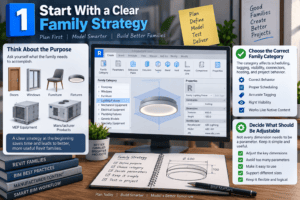
1. Start With a Clear Family Strategy
One of the biggest mistakes is opening the Family Editor and immediately beginning to model.
Instead, spend a few minutes planning.
Ask yourself what the family needs to accomplish. Is it an architectural product such as a door, window, furniture item, or fixture? Is it MEP equipment? Is it a manufacturer product that will appear in schedules and specifications?
This planning stage is the foundation of 5 Smart Ways to Create Better Revit Families.
Choose the Correct Family Category
The category affects how the family behaves inside a project.
For example, a lighting fixture should not be created as a generic model simply because the generic model category appears convenient. Choosing the appropriate category can affect scheduling, tagging, visibility, connectors, hosting, and project behavior.
For manufacturer content, category selection deserves particular attention because users often expect the downloaded family to behave like native Revit content.
Decide What Should Be Adjustable
Not every dimension needs to become a parameter.
If you expose too many parameters, the family becomes difficult to understand. If you expose too few, users may need several separate families for different sizes.
A practical rule is to make the dimensions and properties that users genuinely need adjustable.
That balance is one of the central ideas in 5 Smart Ways to Create Better Revit Families.
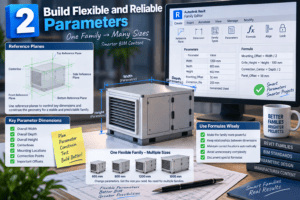
2. Build Flexible and Reliable Parameters
Parameters are what turn static geometry into useful BIM content.
Imagine a manufacturer creates a family for a piece of equipment available in several widths and heights. Creating a separate family for every size can quickly create a large content library.
A better solution may be one flexible family with properly designed parameters.
This is another important part of 5 Smart Ways to Create Better Revit Families.
Use Reference Planes Properly
Reference planes should control the important geometry instead of relying on random dimensions.
For example, establish reference planes for:
- Overall width
- Overall depth
- Overall height
- Centerlines
- Mounting locations
- Connection points
- Important offsets
Then constrain the geometry to those reference planes.
This creates a more predictable family.
Use Formulas Where They Actually Help
Formulas can make a family much more powerful.
For example, one dimension might depend on another dimension. A mounting location could remain centered when the overall width changes. A secondary component could maintain a fixed distance from an edge.
However, formulas should not be added simply because they are available.
A complicated formula system can make a family difficult to troubleshoot. Keep formulas understandable and document unusual logic when necessary.
The practical goal of 5 Smart Ways to Create Better Revit Families is flexibility without unnecessary complexity.
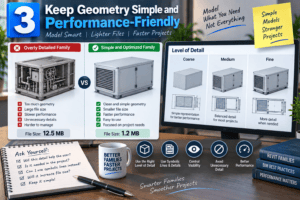
3. Keep Geometry Simple and Performance-Friendly
A family can look fantastic in a 3D view and still be a poor Revit family.
Why?
Because detailed geometry can increase file size and slow down projects.
This becomes especially important with manufacturer content. Real products may contain hundreds or thousands of small physical components, but modeling every screw, groove, hole, and internal part is usually unnecessary.
The third principle of 5 Smart Ways to Create Better Revit Families is therefore simple: model what the project needs, not everything the real product contains.
Use the Right Level of Detail
Consider how the object will be viewed.
A large piece of equipment may require more detail in an elevation than a small accessory. A product that appears mainly in plan view may need different geometry from something commonly shown in 3D presentations.
Use symbolic lines, detail components, masking regions, and visibility controls where appropriate rather than relying entirely on 3D geometry.
Avoid Unnecessary Detail
Before adding another piece of geometry, ask:
“Will this detail help the user?”
If the answer is no, leave it out.
A lightweight family that performs well is often more valuable than an extremely detailed family that slows down a project.
That performance-first mindset is a major reason 5 Smart Ways to Create Better Revit Families works well for manufacturer content.
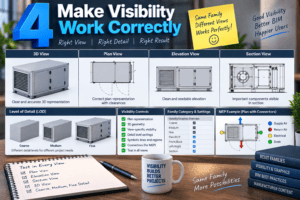
4. Make Visibility Work Correctly
A family may look perfect in one view and completely wrong in another.
This usually happens when visibility has not been planned properly.
A manufacturer family should be tested in plan, elevation, section, 3D, and—where relevant—different detail levels.
This is one of the most important checks in 5 Smart Ways to Create Better Revit Families.
Test Coarse, Medium, and Fine Detail
Different Revit views can display different levels of detail.
At coarse detail, users generally need a simple representation. At medium detail, important components may become visible. At fine detail, additional geometry can appear.
Not every family needs dramatic changes between these levels, but the behavior should be intentional.
Check Plan Representation
Plan representation is particularly important.
A piece of equipment may look correct in 3D but become confusing when viewed from above. Make sure important edges, clearances, connection points, and symbolic information are represented appropriately.
For MEP families, connectors and equipment orientation deserve additional attention.
Good visibility control is one of the practical differences between a family that merely works and one that users enjoy using.
5. Add Useful Manufacturer Data
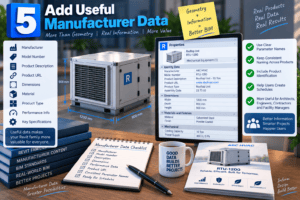
A manufacturer Revit family is more than geometry.
BIM users often need information such as:
- Manufacturer
- Model number
- Product description
- Product URL
- Dimensions
- Material
- Product type
- Performance information
- Key specifications
This data can make the family significantly more useful.
The final principle in 5 Smart Ways to Create Better Revit Families is therefore to treat the family as both geometry and information.
Use Consistent Parameter Names
Parameter names should be easy to understand.
Avoid abbreviations that only make sense to the person who created the family. If a parameter will be used by architects, engineers, contractors, or facility managers, use terminology that makes sense to the intended audience.
Consistency also matters when a manufacturer publishes multiple families.
If every product uses different parameter names for the same information, users may struggle when creating schedules or filtering project content.
Include Product Identification
Manufacturer content should make it easy to identify the actual product represented by the family.
Model numbers, product names, descriptions, and manufacturer information can help users verify that they are selecting the correct item.
This is especially valuable when families are downloaded from a manufacturer’s website and later become part of a large project.
Test Before You Publish
Even a carefully modeled family can contain small problems.
Before publishing manufacturer content, place the family into a clean test project.
Change the type parameters. Stretch the dimensions. Switch detail levels. Look at different views. Check tags and schedules. Rotate the family if users may need different orientations.
This testing process is where 5 Smart Ways to Create Better Revit Families becomes practical rather than theoretical.
Look for Warning Signs
Pay attention to:
- Broken constraints
- Incorrect dimensions
- Unexpected geometry
- Missing symbolic lines
- Incorrect visibility
- Excessive file size
- Poor plan representation
- Incorrect connectors
- Unnecessary parameters
- Confusing type names
Fix these problems before releasing the family.
A few minutes of testing can prevent many hours of frustration for the people who eventually use the content.
Create Families for Real Users
It is easy to become focused on modeling accuracy and forget the person who will actually use the family.
A BIM modeler may download a manufacturer’s family because they need to complete a project quickly. They do not want to spend twenty minutes figuring out which parameter controls the width.
They want to place the product, select the correct size, add the required information, and continue modeling.
That user-focused approach is at the heart of 5 Smart Ways to Create Better Revit Families.
Think about the entire user experience.
Can the family be found easily? Is the name clear? Are types organized logically? Are parameters understandable? Does the family display correctly? Does the information appear correctly in schedules?
If the answer is yes, you are creating content that provides real value.
Common Mistakes to Avoid
Many family problems come from a few recurring mistakes.
One common mistake is excessive geometry. Another is creating too many parameters. Some creators also rely heavily on nested families without considering performance or maintenance.
Another problem is failing to test families in a real project environment.
Avoiding these mistakes reinforces the main lesson of 5 Smart Ways to Create Better Revit Families: simplicity, reliability, and usability should guide the modeling process.
Do not try to impress users with complexity.
Instead, make the family predictable.
Final Thoughts
Creating professional Revit families is about much more than knowing how to use extrusions, blends, sweeps, voids, and reference planes. A successful family needs to work smoothly, display correctly, remain lightweight, and provide useful information to the people using it.
The key ideas in 5 Smart Ways to Create Better Revit Families show how thoughtful planning can make a significant difference in the quality of your BIM content.
Start by defining the purpose of the family before modeling. Use parameters that provide real flexibility, keep the geometry as simple as possible, and make sure visibility works correctly in different views. These practical steps are at the heart of 5 Smart Ways to Create Better Revit Families.
Manufacturer content also needs accurate and useful product information. Adding details such as the manufacturer name, model number, product description, dimensions, and product URL can make a family far more valuable to architects and BIM professionals.
Testing is another step that should never be skipped. Place the family in a project, change its parameters, check different views, and make sure it behaves as expected. Following 5 Smart Ways to Create Better Revit Families helps you identify problems before the family reaches your users.
Ultimately, the goal is not to create the most complicated family possible. The goal is to create content that users can download, place, adjust, document, and trust without unnecessary frustration. That user-focused approach is what makes 5 Smart Ways to Create Better Revit Families so important for anyone developing professional BIM content.
A great Revit family should be accurate, flexible, lightweight, informative, and easy to use. When those qualities come together, your manufacturer content becomes more than a 3D model—it becomes a reliable BIM resource that professionals can confidently use in their projects.
For more information click here.