5 Powerful Electrical Revit Families (part2)
Are you ready to take your electrical BIM modeling skills to the next level? Commercial electrical projects require more than basic lighting fixtures, outlets, and switches. Electrical engineers and Revit modelers also need reliable equipment families to represent power distribution, electrical connections, safety systems, and specialized building services.
In this second guide, 5 Powerful Electrical Revit Families (part2) continues the discussion of useful Revit content for commercial projects. This article explores five additional electrical family categories that can help you build more detailed, organized, and coordinated BIM models.
Whether you work on shopping centers, restaurants, office buildings, warehouses, hospitals, or retail stores, understanding these components can improve your modeling workflow and documentation.
At RevitFamiliesHub, we aim to help Revit professionals discover practical resources and develop better BIM workflows. This practical continuation of 5 Powerful Electrical Revit Families (part2) is designed to help you choose useful content for real commercial work. Let’s explore five additional electrical family categories worth considering for your next project.
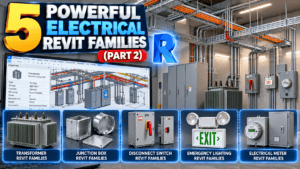
Why You Need More Electrical Revit Families
Commercial buildings contain many electrical systems, and every project has different requirements. A small retail store may need only a limited selection of equipment, while a large commercial facility may require transformers, disconnect switches, junction boxes, emergency lighting, and specialized distribution components.
Following 5 Powerful Electrical Revit Families (part2), expanding your family library can help you represent these systems more consistently.
Well-organized families can help you:
- Reduce repetitive modeling tasks.
- Improve equipment identification and documentation.
- Coordinate electrical components with architectural and mechanical models.
- Maintain consistent dimensions and parameters.
- Support schedules when families are configured appropriately.
- Create clearer drawings for project coordination.
Remember that a family should not be selected simply because it looks realistic. As 5 Powerful Electrical Revit Families (part2) emphasizes, its dimensions, parameters, connectors, and functionality should match the project’s requirements.
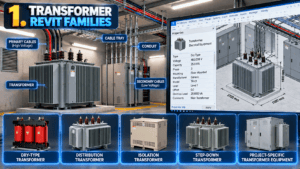
1. Transformer Revit Families
What Are Electrical Transformer Families?
Transformers are important electrical equipment used to change voltage levels in electrical distribution systems. Depending on the building’s design, transformers may be installed in electrical rooms, utility areas, service spaces, or designated equipment locations.
For professionals exploring 5 Powerful Electrical Revit Families (part2), transformer families are a useful addition to a commercial electrical BIM library.
Common transformer representations include:
- Dry-type transformers
- Distribution transformers
- Isolation transformers
- Step-down transformers
- Project-specific transformer equipment
The exact equipment required depends on the electrical engineer’s design and the building’s power distribution requirements.
How to Use Transformer Families in Revit
A transformer family can represent equipment dimensions, identification, mounting arrangements, and other relevant parameters. Depending on its configuration, it may also contain electrical connectors that support circuiting and electrical system calculations.
When placing transformer equipment, coordinate its location with the electrical room layout, cable routes, structural elements, and required maintenance access.
Check the manufacturer’s dimensions and project specifications before finalizing the equipment representation. This is an important step when applying 5 Powerful Electrical Revit Families (part2) to an active project.
Pro tip: Do not rely on a generic 3D model for electrical calculations. Verify connector settings and technical data whenever the family is intended to support electrical system functionality.
2. Junction Box Revit Families
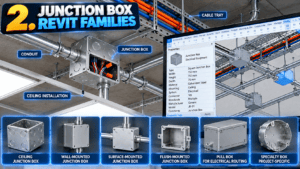
Why Junction Boxes Matter
Junction boxes provide enclosures for electrical connections and cable junctions. They may be used in ceilings, walls, service areas, and other locations depending on the installation design.
Within 5 Powerful Electrical Revit Families (part2), junction boxes are a practical category to explore because they can help represent electrical connection points in coordinated commercial models.
Common types include:
- Ceiling junction boxes
- Wall-mounted junction boxes
- Surface-mounted electrical boxes
- Flush-mounted boxes
- Pull boxes for electrical routing
- Specialty boxes for project-specific installations
Different boxes serve different purposes, so the correct selection should follow the electrical drawings and applicable requirements. This selection process is another practical lesson from 5 Powerful Electrical Revit Families (part2).
Best Practices for Junction Box Placement
In Revit, junction box families can communicate the approximate location, dimensions, and type of electrical enclosure.
Coordinate their placement with ceiling layouts, walls, cable tray routes, conduit runs, and other building services. Ensure that the modeled location reflects the design intent and that access requirements are considered. In 5 Powerful Electrical Revit Families (part2), coordination remains a key theme for every family category.
If the family is expected to participate in electrical circuiting, verify its connectors and parameters rather than assuming that the geometry alone provides the required functionality.
Pro tip: Use clear family names and consistent parameters to make junction boxes easier to identify in schedules and project documentation.
3. Electrical Disconnect Switch Revit Families
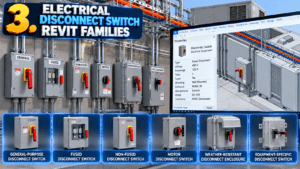
Understanding Electrical Disconnect Switches
Disconnect switches are used to isolate electrical equipment from its power source when required by the system design. They are commonly associated with equipment that needs a dedicated means of disconnection.
Examples include disconnects for HVAC equipment, commercial appliances, motors, and other electrical installations.
When continuing 5 Powerful Electrical Revit Families (part2), disconnect switch families are worth considering for projects that require detailed equipment coordination.
Common categories include:
- General-purpose disconnect switches
- Fused disconnect switches
- Non-fused disconnect switches
- Motor disconnects
- Weather-resistant disconnect enclosures
- Equipment-specific disconnects
The correct type and rating must be determined from the project design and applicable electrical requirements. Use 5 Powerful Electrical Revit Families (part2) as a reminder to verify specifications rather than relying on appearance alone.
How to Model Disconnect Switches
A disconnect switch family can include equipment dimensions, mounting information, identification parameters, and manufacturer details.
Place the component in accordance with the electrical drawings and coordinate it with the equipment it serves. Check the surrounding walls, access clearances, conduit routes, and service requirements.
For example, a commercial rooftop HVAC unit may require a disconnect location coordinated with the unit’s installation and electrical connection details.
A visually accurate family does not automatically verify electrical ratings, protection requirements, or code compliance. Those details must be checked against the approved design. This principle also applies throughout 5 Powerful Electrical Revit Families (part2).
Pro tip: Use manufacturer-specific content when accurate equipment dimensions and clearances are important to the project.
4. Emergency Lighting Revit Families
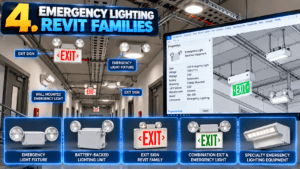
Why Emergency Lighting Is Important
Emergency lighting helps provide illumination during certain emergency conditions, such as a loss of normal lighting power. Its design and placement depend on the building layout, applicable codes, and project requirements.
Typical emergency lighting components include:
- Emergency light fixtures
- Battery-backed lighting units
- Exit signs
- Combination exit and emergency lighting units
- Emergency lighting equipment specified for particular spaces
For designers reading 5 Powerful Electrical Revit Families (part2), emergency lighting families offer another way to improve the completeness of commercial electrical plans.
How to Use Emergency Lighting Families
Load the appropriate family and place it according to the approved lighting design. Coordinate emergency fixtures with corridors, exits, stairs, changes in floor level, and other areas identified in the project documentation.
Use clear names and annotations to distinguish emergency lighting from normal lighting. Where required, use suitable parameters and schedules to identify emergency equipment.
Remember that placing an emergency light symbol in Revit does not prove that the design meets illumination levels, duration requirements, or applicable safety codes. Those items require appropriate design verification. This practical approach complements the guidance in 5 Powerful Electrical Revit Families (part2).
Pro tip: Check emergency lighting locations against the life-safety plans and approved electrical drawings before completing the model. Remember this when using the equipment examples in 5 Powerful Electrical Revit Families (part2).
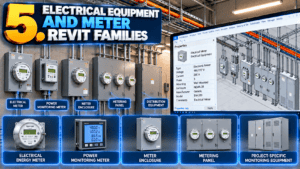
5. Electrical Equipment and Meter Families
What Are Electrical Meter Families?
Electrical meters and associated equipment represent devices used to measure or monitor electrical quantities. Depending on the project, they may be installed in electrical rooms, distribution areas, service spaces, or designated equipment locations.
In the broader context of 5 Powerful Electrical Revit Families (part2), meter families can help modelers represent additional electrical equipment beyond standard devices.
Examples include:
- Electrical energy meters
- Power monitoring meters
- Meter enclosures
- Metering panels
- Project-specific monitoring equipment
The required equipment depends on the electrical design, utility requirements, and the building’s monitoring needs. As with every category in 5 Powerful Electrical Revit Families (part2), project requirements should guide the selection.
How to Use Meter Families in Commercial Projects
Meter families may contain dimensions, equipment identification, manufacturer information, and relevant parameters. Some families can also represent connections or data associated with monitoring systems, depending on their configuration.
When placing meters, coordinate them with electrical panels, distribution equipment, service access, and conduit routes.
For example, a commercial building may require metering equipment to monitor specific electrical loads or record energy consumption for designated areas.
Pro tip: Verify the equipment specifications and required connections. A generic meter family may represent the physical device without providing actual monitoring or calculation functionality. This distinction is essential when applying 5 Powerful Electrical Revit Families (part2) to BIM documentation.
How to Select the Right Electrical Revit Families
Choosing suitable content is an important part of maintaining a reliable BIM model. As you expand the library introduced in 5 Powerful Electrical Revit Families (part2), consider the following checks before using new families.
1. Check Revit Compatibility
Confirm that the family is compatible with your Revit version. Test downloaded content in a sample project before adding it to a production model. This simple check supports the reliable workflow described in 5 Powerful Electrical Revit Families (part2).
2. Review Parameters and Connectors
Inspect the available type and instance parameters. For electrical equipment, verify connector configuration whenever circuiting or electrical system functionality is required. It is one of the most useful checks to carry forward from 5 Powerful Electrical Revit Families (part2).
3. Check Dimensions and Clearances
Compare family dimensions with manufacturer documentation and approved drawings. Confirm that the model leaves sufficient space for access, installation, and maintenance as required by the project.
4. Maintain Model Performance
Avoid unnecessary geometric complexity and excessive nested families. Use an appropriate level of detail for the current design stage. This helps keep the content in 5 Powerful Electrical Revit Families (part2) useful without unnecessarily burdening the model.
5. Organize Your Family Library
Create separate folders for transformers, junction boxes, disconnect switches, emergency lighting, and meters. Use descriptive file names so that you can find the correct content quickly.
Where to Find Electrical Revit Families
Finding reliable content can be challenging when project deadlines are tight. Manufacturer BIM libraries and established Revit content websites can provide useful starting points.
When expanding your collection after reading 5 Powerful Electrical Revit Families (part2), check the source, compatibility, licensing terms, and technical accuracy of every downloaded family.
At RevitFamiliesHub, you can explore Revit resources and practical modeling guides designed to help BIM professionals improve their workflows.
Build your library gradually. A smaller collection of well-tested families is often more useful than a large collection of unverified files. That is a practical library-building lesson from 5 Powerful Electrical Revit Families (part2).
Conclusion
Expanding your electrical Revit library can help you represent more of the equipment found in commercial buildings. Transformer, junction box, disconnect switch, emergency lighting, and meter families each serve a different purpose in electrical modeling and documentation. Together, these categories extend the practical scope of 5 Powerful Electrical Revit Families (part2).
The key lessons from 5 Powerful Electrical Revit Families (part2) are to select compatible families, verify their parameters, coordinate equipment with other building systems, and check technical details against the project requirements.
Whether you work on retail stores, office buildings, restaurants, or large commercial facilities, a well-organized library can reduce repetitive work and support a more consistent BIM workflow. This is a central takeaway from 5 Powerful Electrical Revit Families (part2).
Ready to improve your electrical modeling workflow? Visit RevitFamiliesHub for more Revit resources, family collections, and practical guides for commercial BIM projects.
Frequently Asked Questions
What are transformer Revit families used for?
Transformer families represent electrical transformer equipment in a BIM model. Depending on their configuration, they may include dimensions, identification parameters, and electrical connectors. In the context of 5 Powerful Electrical Revit Families (part2), they help communicate equipment placement and key information.
Can junction box families be used in electrical schedules?
Yes, if the family and schedule are configured appropriately. Available information depends on the family parameters and project setup.
Why are disconnect switch families useful?
They help represent equipment isolation devices and communicate their locations in electrical plans and coordinated models. This supports the coordination goals introduced in 5 Powerful Electrical Revit Families (part2).
Do emergency lighting families guarantee code compliance?
No. Families represent equipment, but compliance depends on the design, calculations, placement, specifications, and applicable codes.
Can electrical meter families calculate energy consumption?
Not automatically. A family may represent a meter physically, but actual monitoring or calculation functionality requires an appropriate system, data source, and configuration. Keep this distinction in mind when applying 5 Powerful Electrical Revit Families (part2) to a live commercial project.
For more information click here.