5 Powerful Revit Documentation Best Practices
Introduction
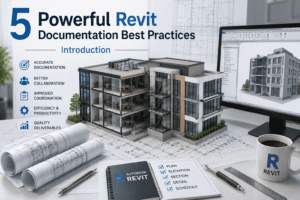
Creating high-quality construction documents is one of the most important responsibilities for architects, BIM managers, engineers, and Revit professionals. While developing a detailed 3D model is essential, the ultimate goal of any BIM project is to generate accurate, coordinated, and construction-ready documentation. Poor documentation can lead to costly errors, project delays, and communication gaps between project stakeholders.
Understanding 5 Powerful Revit Documentation Best Practices can help professionals improve drawing quality, increase efficiency, and maintain consistency throughout the project lifecycle. Revit offers advanced documentation tools that allow teams to produce floor plans, elevations, sections, schedules, and detailed drawings directly from the building model.
By implementing 5 Powerful Revit Documentation Best Practices, project teams can streamline workflows, reduce rework, and deliver professional documentation that supports successful construction projects.
Why Revit Documentation Is Critical for BIM Projects
Construction documents serve as the primary communication method between designers, contractors, consultants, and owners. Every dimension, note, detail, and schedule contributes to the successful execution of a project.
Following 5 Powerful Revit Documentation Best Practices helps teams maintain accuracy while ensuring that documentation remains coordinated with the BIM model.
Benefits of Proper Documentation
- Improved project coordination
- Reduced construction errors
- Faster project approvals
- Better communication among teams
- Increased productivity
- Enhanced BIM workflows
- More reliable project information
Organizations that consistently apply 5 Powerful Revit Documentation Best Practices often experience better project outcomes and fewer documentation-related issues.
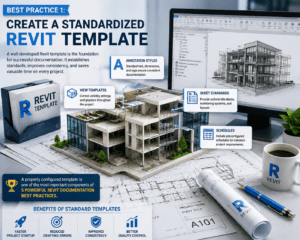
Best Practice 1: Create a Standardized Revit Template
A well-developed Revit template serves as the foundation for successful documentation. Templates establish standards before project work begins and help maintain consistency across all deliverables.
What Should Be Included in a Template?
Annotation Styles
Standard text, dimensions, and tags ensure consistent documentation.
View Templates
Control visibility settings and graphics throughout the project.
Sheet Standards
Provide uniform title blocks, numbering systems, and layouts.
Schedules
Include preconfigured schedules for common project requirements.
A properly configured template is one of the most important components of 5 Powerful Revit Documentation Best Practices.
Benefits of Standard Templates
- Faster project startup
- Reduced drafting errors
- Improved consistency
- Better quality control
Many BIM managers consider template development the first step toward implementing 5 Powerful Revit Documentation Best Practices.
Best Practice 2: Use View Templates and Consistent Graphics
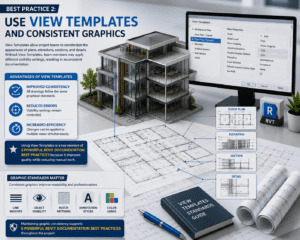
View Templates allow project teams to standardize the appearance of plans, elevations, sections, and details.
Without View Templates, team members may apply different visibility settings, resulting in inconsistent documentation.
Advantages of View Templates
Improved Consistency
All drawings follow the same graphical standards.
Reduced Errors
Visibility settings remain controlled.
Increased Efficiency
Changes can be applied to multiple views simultaneously.
Using View Templates is a key element of 5 Powerful Revit Documentation Best Practices because it improves quality while reducing manual work.
Graphic Standards Matter
Consistent graphics improve readability and professionalism.
Important graphic standards include:
- Line weights
- Object visibility
- Hatch patterns
- Annotation styles
- Color usage
Maintaining graphic consistency supports 5 Powerful Revit Documentation Best Practices throughout the project.
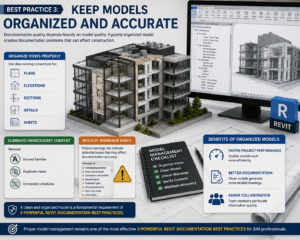
Best Practice 3: Keep Models Organized and Accurate
Documentation quality depends heavily on model quality. A poorly organized model creates documentation problems that can affect construction.
Organize Views Properly
Use clear naming conventions for:
- Plans
- Elevations
- Sections
- Details
- Sheets
Eliminate Unnecessary Content
Remove:
- Unused families
- Duplicate views
- Unneeded schedules
Resolve Warnings Early
Project warnings can indicate potential issues that may affect documentation accuracy.
A clean and organized model is a fundamental requirement of 5 Powerful Revit Documentation Best Practices.
Benefits of Organized Models
Faster Project Performance
Smaller models work more efficiently.
Better Documentation
Clean models generate more reliable drawings.
Easier Collaboration
Team members can locate information quickly.
Proper model management remains one of the most effective 5 Powerful Revit Documentation Best Practices for BIM professionals.
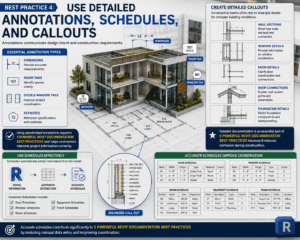
Best Practice 4: Use Detailed Annotations, Schedules, and Callouts
Annotations communicate design intent and construction requirements.
Essential Annotation Types
Dimensions
Provide accurate measurements.
Room Tags
Identify spaces clearly.
Door and Window Tags
Improve project coordination.
Keynotes
Reference specifications and materials.
Using standardized annotations supports 5 Powerful Revit Documentation Best Practices and helps contractors interpret project information correctly.
Create Detailed Callouts
Construction teams often rely on enlarged details for complex building conditions.
Important detail views include:
- Wall Sections
- Window Details
- Door Details
- Roof Connections
- Foundation Details
Detailed documentation is an essential part of 5 Powerful Revit Documentation Best Practices because it reduces confusion during construction.
Use Schedules Effectively
Schedules automatically extract information from the model.
Common schedules include:
- Door Schedules
- Window Schedules
- Room Schedules
- Equipment Schedules
- Finish Schedules
Accurate schedules contribute significantly to 5 Powerful Revit Documentation Best Practices by reducing manual data entry and improving coordination.
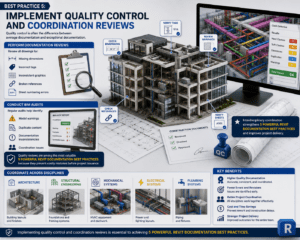
Best Practice 5: Implement Quality Control and Coordination Reviews
Quality control is often the difference between average documentation and exceptional documentation.
Perform Documentation Reviews
Review all drawings for:
- Missing dimensions
- Incorrect tags
- Inconsistent graphics
- Broken references
- Sheet numbering errors
Conduct BIM Audits
Regular audits help identify:
- Model warnings
- Duplicate content
- Documentation inconsistencies
- Coordination issues
Quality reviews are among the most valuable 5 Powerful Revit Documentation Best Practices because they prevent costly mistakes before project issuance.
Coordinate Across Disciplines
Successful BIM projects require coordination between:
Architecture
Building layouts and finishes.
Structural Engineering
Foundations and framing systems.
Mechanical Systems
HVAC equipment and ductwork.
Electrical Systems
Power and lighting layouts.
Plumbing Systems
Piping and fixtures.
Interdisciplinary coordination strengthens 5 Powerful Revit Documentation Best Practices and improves project delivery.
Common Documentation Mistakes to Avoid
Even experienced Revit users occasionally encounter documentation challenges.
Common mistakes include:
- Inconsistent view scales
- Missing annotations
- Duplicate tags
- Poor sheet organization
- Uncoordinated schedules
- Excessive model warnings
- Missing details
Avoiding these mistakes helps maximize the effectiveness of 5 Powerful Revit Documentation Best Practices.
Future Trends in Revit Documentation
The future of BIM documentation continues to evolve with technology.
Emerging trends include:
Cloud-Based Collaboration
Teams can work together in real time.
Automated Documentation
AI-assisted tools help generate documentation faster.
Digital Construction Workflows
Integration between BIM and construction platforms improves efficiency.
Advanced Quality Control
Automated model checking reduces documentation errors.
As technology advances, 5 Powerful Revit Documentation Best Practices will remain essential for producing accurate and reliable construction documents.
Conclusion
High-quality documentation is critical to the success of every BIM project. While Revit provides powerful tools for creating construction documents, achieving professional results requires a structured approach, strong standards, and continuous quality control.
By following 5 Powerful Revit Documentation Best Practices, professionals can improve coordination, reduce errors, enhance communication, and create documentation that supports efficient construction workflows. From standardized templates and view management to detailed annotations, schedules, and quality reviews, these strategies help ensure that every project delivers accurate and dependable construction documents.
Organizations that consistently implement 5 Powerful Revit Documentation Best Practices position themselves for long-term BIM success while providing greater value to clients, contractors, and project stakeholders.
For more information click here