7 Powerful Revit Family Fixes
Introduction
Every successful BIM project begins with high-quality Revit families. Whether you’re designing architectural elements, structural components, or MEP systems, the performance of your model depends heavily on the quality of its families. Implementing 7 Powerful Revit Family Fixes can significantly improve model efficiency, reduce errors, and create a smoother workflow for everyone involved in the project.
Many BIM professionals focus on modeling geometry but overlook the importance of family optimization. By applying 7 Powerful Revit Family Fixes, you can create reusable, lightweight, and intelligent Revit families that enhance collaboration, improve documentation, and reduce long-term maintenance.
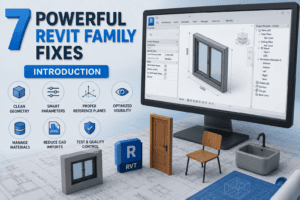
Why 7 Powerful Revit Family Fixes Matter
A Revit family is more than just a 3D object. It contains geometry, parameters, materials, visibility settings, and valuable project data. When families are poorly designed, they can negatively affect the performance of an entire project.
Applying 7 Powerful Revit Family Fixes helps create families that are easier to manage, load faster, and perform consistently throughout every stage of the BIM process.
Benefits of Applying 7 Powerful Revit Family Fixes
- Faster project performance
- Smaller Revit file sizes
- Improved BIM coordination
- More accurate schedules
- Better documentation
- Easier family maintenance
- Higher-quality BIM standards
Fix 1: Remove Redundant Content That Adds No Value
Identify Performance Bottlenecks
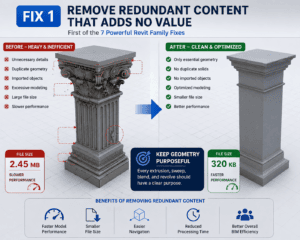
The first of the 7 Powerful Revit Family Fixes focuses on eliminating unnecessary geometry. Decorative details, duplicate solids, imported objects, and excessive modeling often increase family size without providing meaningful value.
Instead of creating highly detailed objects, develop families that communicate the required design intent while maintaining excellent performance.
Keep Geometry Purposeful
Every extrusion, sweep, blend, and revolve should have a clear purpose. Removing unnecessary geometry is one of the easiest 7 Powerful Revit Family Fixes you can implement to improve model speed and reduce project complexity.
Fix 2: Design Families That Adapt to Change
Think Beyond Fixed Sizes
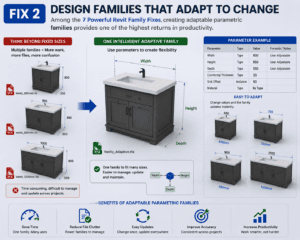
Flexible families eliminate the need to create multiple versions of the same object. One intelligent family can support numerous project requirements by using well-planned parameters.
Among the 7 Powerful Revit Family Fixes, creating adaptable parametric families provides one of the highest returns in productivity.
Maintain Logical Relationships
Parameters should interact predictably without creating conflicts. Well-organized parameter relationships reduce editing time and improve consistency across projects.
Fix 3: Strengthen the Internal Structure
Organize Reference Elements
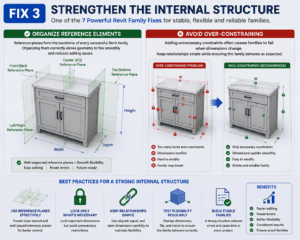
Reference planes form the backbone of every successful Revit family. Organizing them correctly allows geometry to flex smoothly and reduces editing issues.
This is one of the most important 7 Powerful Revit Family Fixes because a stable family structure supports future modifications with minimal effort.
Avoid Over-Constraining
Adding unnecessary constraints often causes families to fail when dimensions change. Keep relationships simple while ensuring the family behaves as expected.
Fix 4: Improve How Families Display in Different Views
Tailor Content for Each Drawing Type
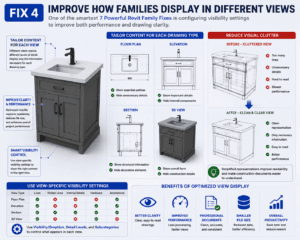
Different views require different levels of detail. Floor plans, elevations, sections, and 3D views should each display only the information necessary for that specific purpose.
One of the smartest 7 Powerful Revit Family Fixes is configuring visibility settings to improve both performance and drawing clarity.
Reduce Visual Clutter
Simplified representations improve readability and make construction documents easier to understand while reducing unnecessary processing.
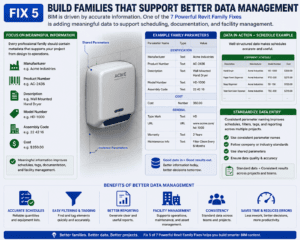
Fix 5: Build Families That Support Better Data Management
Focus on Meaningful Information
BIM is driven by accurate information. Every professional family should contain metadata that supports scheduling, facility management, and documentation.
Useful information may include:
- Manufacturer
- Product Number
- Description
- Model Number
- Assembly Code
- Cost
Adding meaningful information is another valuable step in implementing 7 Powerful Revit Family Fixes.
Standardize Data Entry
Consistent parameter naming improves schedules, filters, tags, and reporting across multiple projects.
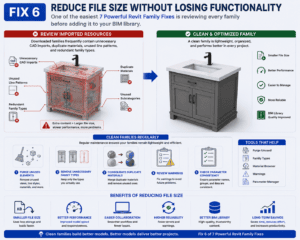
Fix 6: Reduce File Size Without Losing Functionality
Review Imported Resources
Downloaded families frequently contain unnecessary CAD imports, duplicate materials, unused line patterns, and redundant family types.
One of the easiest 7 Powerful Revit Family Fixes is reviewing every family before adding it to your BIM library.
Clean Families Regularly
Regular maintenance should include:
- Purging unused elements
- Removing unnecessary family types
- Consolidating duplicate materials
- Reviewing warnings
- Checking parameter consistency
These practices ensure your families remain lightweight and efficient.
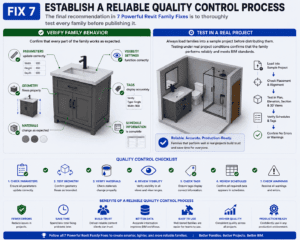
Fix 7: Establish a Reliable Quality Control Process
Verify Family Behavior
The final recommendation in 7 Powerful Revit Family Fixes is to thoroughly test every family before publishing it.
Confirm that:
- Parameters update correctly
- Geometry flexes properly
- Materials change as expected
- Visibility settings function correctly
- Tags display accurately
- Schedule information is complete
Test in a Real Project
Always load families into a sample project before distributing them. Testing under real project conditions confirms that the family performs reliably and meets BIM standards.
Following all 7 Powerful Revit Family Fixes ensures your content is ready for production environments.
Build a Professional Revit Family Library
A well-maintained family library increases productivity and reduces duplicate work. Organize content into logical categories such as architectural, structural, electrical, plumbing, HVAC, furniture, and specialty equipment.
As your library grows, continue applying 7 Powerful Revit Family Fixes to existing families so they remain efficient, consistent, and easy to maintain.
Best Practices for Long-Term Success
Professional BIM teams continually improve their libraries by following consistent standards.
Maintain Clear Naming Standards
Use descriptive names that make searching simple and reduce confusion.
Review Families Regularly
Periodic audits help identify outdated content and improve library quality.
Minimize Duplicate Families
Reducing duplicate content simplifies maintenance and ensures consistency.
Follow Company BIM Standards
Standardized templates, parameters, and workflows make collaboration much easier across teams and projects.
These habits complement the 7 Powerful Revit Family Fixes and contribute to a more reliable BIM workflow.
Common Problems and Practical Solutions
Even experienced users face challenges when developing Revit families.
Common issues include:
- Large family file sizes
- Broken parameters
- Missing metadata
- Incorrect schedules
- Duplicate materials
- Poor visibility settings
- Outdated family versions
Fortunately, implementing 7 Powerful Revit Family Fixes addresses these problems before they affect project performance.
Conclusion
High-quality Revit families are essential for successful BIM projects. Rather than focusing only on geometry, professionals should prioritize performance, flexibility, organization, and data quality. By applying 7 Powerful Revit Family Fixes, you can create families that load faster, perform better, and support accurate project documentation.
Whether you are building a new BIM library or improving an existing one, 7 Powerful Revit Family Fixes provide a practical framework for creating dependable Revit content. As your projects become more complex, these improvements will help reduce maintenance, strengthen collaboration, and improve overall model performance.
Start implementing 7 Powerful Revit Family Fixes today, and you’ll build a faster, cleaner, and more professional Revit library that delivers long-term value for every BIM project.
For information click here.