7 Powerful Revit Family Pro Tips: Build Smarter Parametric Families Like a Pro
Creating a Revit family is one thing—but creating a smart, lightweight, and fully parametric Revit family that performs flawlessly in real-world BIM projects is another challenge altogether.
If you’ve ever spent hours fixing broken constraints, struggling with formulas, or rebuilding a family from scratch because it wouldn’t flex correctly, you’re not alone. Every Revit professional has faced these frustrations. The good news is that they can be avoided with the right approach.
These 7 Powerful Revit Family Pro Tips are based on professional BIM workflows used by experienced architects, MEP engineers, and BIM managers. Whether you’re designing furniture, lighting fixtures, plumbing equipment, structural components, or custom architectural elements, these proven techniques will help you build cleaner, faster, and more reliable Revit families.
Instead of spending hours troubleshooting, you’ll learn how to create families that are easier to modify, lighter in file size, and ready for production projects.
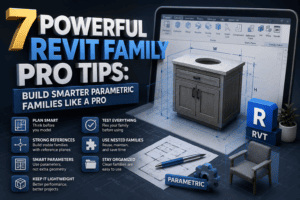
Why These 7 Powerful Revit Family Pro Tips Matter
Every BIM project depends on the quality of its Revit families. Poorly created families don’t just waste time—they increase project file size, slow model performance, create coordination issues, and frustrate everyone on the team.
Professional Revit families should always be:
- Lightweight
- Fully parametric
- Easy to edit
- Fast to load
- BIM-compliant
- Reusable across multiple projects
- Simple for other team members to understand
Learning these 7 Powerful Revit Family Pro Tips will save countless hours throughout your BIM career.
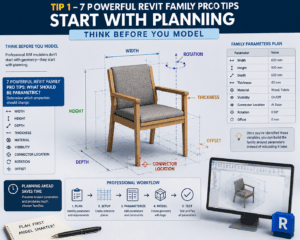
Tip 1 – 7 Powerful Revit Family Pro Tips Start with Planning
Think Before You Model
One of the biggest mistakes beginners make is opening Revit and immediately drawing geometry.
Professional BIM modelers don’t start with geometry—they start with planning.
Before creating your first extrusion, ask yourself:
7 Powerful Revit Family Pro Tips: What Should Be Parametric?
Determine which properties should change:
- Width
- Height
- Depth
- Thickness
- Material
- Visibility
- Connector Location
- Rotation
- Offset
Once you’ve identified these variables, you can build your family around parameters instead of rebuilding it later.
Planning ahead saves time, prevents broken constraints, and produces much cleaner families.
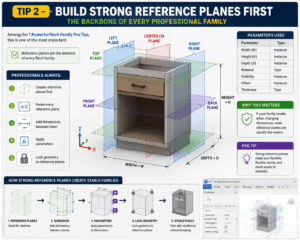
Tip 2 – Build Strong Reference Planes First
The Backbone of Every Professional Family
Among the 7 Powerful Revit Family Pro Tips, this is one of the most important.
Reference planes are the skeleton of every Revit family.
Instead of locking geometry directly to other geometry, professionals always:
- Create reference planes first
- Name every reference plane
- Add dimensions between them
- Apply parameters
- Lock geometry to reference planes
7 Powerful Revit Family Pro Tips for Stable Families
If your family breaks when changing dimensions, weak reference planes are usually the reason.
Strong reference planes make your families flexible, stable, and much easier to maintain.
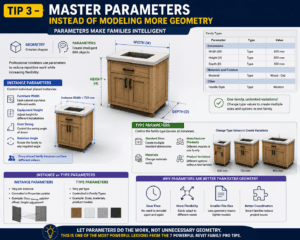
Tip 3 – Master Parameters Instead of Modeling More Geometry
Parameters Make Families Intelligent
Geometry creates shapes.
Parameters create intelligent BIM objects.
Professional modelers use parameters to reduce repetitive work while increasing flexibility.
Instance Parameters
Use these for:
- Furniture width
- Equipment height
- Door swing
- Rotation angle
Each placed family can have different values.
Type Parameters
Perfect for:
- Standard sizes
- Manufacturer products
- Materials
- Product variations
Using Type Parameters allows one family to represent multiple products without creating multiple files.
One of the biggest lessons from these 7 Powerful Revit Family Pro Tips is to let parameters do the work—not unnecessary geometry.
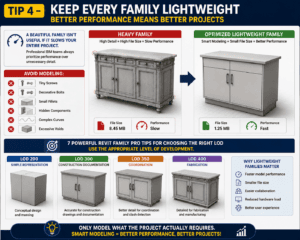
Tip 4 – Keep Every Family Lightweight
Better Performance Means Better Projects
A beautiful family isn’t useful if it slows your entire project.
Professional BIM teams always prioritize performance over unnecessary detail.
Avoid modeling:
- Tiny screws
- Decorative bolts
- Small fillets
- Hidden components
- Complex curves
- Excessive voids
7 Powerful Revit Family Pro Tips for Choosing the Right LOD
Use the appropriate Level of Development.
LOD 200
Simple representation.
LOD 300
Construction documentation.
LOD 350
Coordination.
LOD 400
Fabrication.
Only model what the project actually requires.
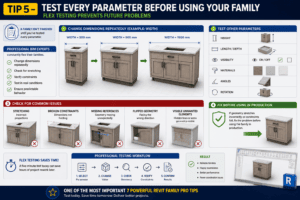
Tip 5 – Test Every Parameter Before Using Your Family
Flex Testing Prevents Future Problems
A family isn’t finished until you’ve tested every parameter.
Professional BIM experts constantly flex their families.
Change dimensions repeatedly.
For example:
- Width = 300 mm
- Width = 900 mm
- Width = 1500 mm
Then test:
- Height
- Length
- Visibility
- Materials
- Angles
- Rotation
7 Powerful Revit Family Pro Tips for Reliable Families
If geometry stretches incorrectly or constraints fail, fix the problem before using the family in production.
A five-minute test today can save hours of project rework later.
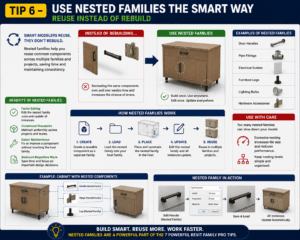
Tip 6 – Use Nested Families the Smart Way
Reuse Instead of Rebuild
One of the smartest 7 Powerful Revit Family Pro Tips is learning when to use nested families.
Instead of recreating common components every time, build reusable nested families.
Examples include:
- Door handles
- Pipe fittings
- Electrical outlets
- Furniture legs
- Lighting bulbs
- Hardware accessories
Benefits include:
- Faster editing
- Consistent standards
- Easier maintenance
- Reduced repetitive work
However, avoid excessive nesting because too many nested families can reduce model performance.
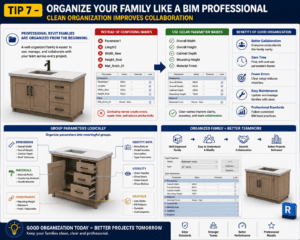
Tip 7 – Organize Your Family Like a BIM Professional
Clean Organization Improves Collaboration
Professional Revit families are organized from the beginning.
Instead of confusing names like:
- Parameter1
- Length2
- Width_New
Use clear parameter names such as:
- Overall Width
- Overall Height
- Cabinet Depth
- Mounting Height
- Material Finish
7 Powerful Revit Family Pro Tips for Better Parameter Management
Group parameters logically.
Recommended groups include:
- Dimensions
- Materials
- Constraints
- Identity Data
- Visibility
- Graphics
This makes your family easier for everyone on your team to understand and modify.
Common Mistakes That These 7 Powerful Revit Family Pro Tips Help You Avoid
Even experienced users sometimes create families that become difficult to maintain.
Avoid these mistakes:
- Locking geometry incorrectly
- Ignoring reference planes
- Creating unnecessary voids
- Using excessive formulas
- Over-modeling tiny details
- Importing CAD files unnecessarily
- Forgetting flex testing
- Leaving unused parameters
- Poor parameter naming
Avoiding these mistakes will significantly improve family quality and model performance.
Professional Workflow Using These 7 Powerful Revit Family Pro Tips
Experienced BIM professionals usually follow this workflow:
Step 1
Study the product.
Step 2
Identify which dimensions should change.
Step 3
Create reference planes.
Step 4
Apply parameters.
Step 5
Model the geometry.
Step 6
Flex-test every parameter.
Step 7
Purge unused content and optimize the family.
Following this process ensures every family remains lightweight, flexible, and production-ready.
Who Should Learn These 7 Powerful Revit Family Pro Tips?
These techniques are valuable for:
- Revit beginners
- BIM modelers
- Architects
- Interior designers
- Structural engineers
- MEP engineers
- Revit freelancers
- BIM coordinators
- BIM managers
Whether you’re creating custom furniture or complex MEP equipment, mastering these 7 Powerful Revit Family Pro Tips will improve both your workflow and project quality.
Final Thoughts on 7 Powerful Revit Family Pro Tips
The difference between an average Revit family and a professional one isn’t the amount of geometry—it’s the intelligence behind the design.
By following these 7 Powerful Revit Family Pro Tips, you’ll build families that are easier to maintain, faster to load, and more flexible in real-world BIM projects. Strong reference planes, well-planned parameters, proper flex testing, and clean organization will not only improve your own productivity but also make collaboration smoother for your entire team.
Remember, every great BIM library starts with high-quality families. Apply these 7 Powerful Revit Family Pro Tips consistently, and you’ll create professional Revit content that saves time, reduces errors, and delivers better results on every project.
For this information click here.