10 Powerful Revit Family Tips to Model Faster
If you work in Autodesk Revit, you probably know that family creation can either make your workflow incredibly efficient or turn into one of the most frustrating parts of a project. A family that is properly planned can be reused hundreds of times, while a poorly built family can force you to repeat the same work again and again.
That is why 10 Powerful Revit Family Tips to Model Faster is more than just a list of modeling tricks. It is a practical approach to creating Revit content that is flexible, lightweight, organized, and easy to reuse.
Whether you are an architect, MEP engineer, BIM modeler, interior designer, contractor, student, or someone learning Revit, better family-building habits can save you significant time. You do not need to know every advanced Family Editor feature. In many cases, a few simple improvements can make a noticeable difference.
This guide explains 10 Powerful Revit Family Tips to Model Faster using practical techniques that can be applied to everyday projects.

Why Revit Families Can Make You Faster
Before looking at 10 Powerful Revit Family Tips to Model Faster, it helps to understand why families are so important.
A Revit family is not simply a 3D object. Depending on the category and purpose, it can contain parameters, reference planes, dimensions, materials, visibility controls, symbolic lines, connectors, nested components, and multiple types.
For example, imagine you need 50 wall-mounted sinks in a project. If the family is correctly created, you can load it once and place it wherever required. If the width, height, mounting information, and other properties are parameterized, you can make changes without rebuilding the entire object.
This is where 10 Powerful Revit Family Tips to Model Faster becomes useful. The objective is to spend less time creating the same content repeatedly.
A good family should answer three questions:
- Can I control it easily?
- Can I reuse it?
- Will it perform well in a large project?
If the answer is yes to all three, you are already moving in the right direction.
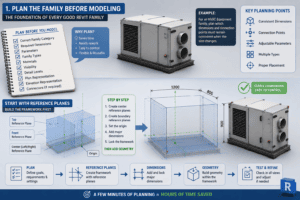
1. Plan the Family Before Modeling
The first lesson in 10 Powerful Revit Family Tips to Model Faster is to plan before you draw.
It is tempting to open the Family Editor, create an extrusion, and start shaping the object. That approach may work for a very simple family, but it can become a problem when the family needs adjustable dimensions.
Before creating geometry, decide what the family needs to accomplish.
Think about:
- The correct family category
- Required dimensions
- Parameters
- Family types
- Materials
- Visibility
- Detail levels
- Plan representation
- Elevation representation
- Connectors, if required
For example, if you are creating an HVAC equipment family, decide which dimensions and connection points need to remain consistent when the equipment size changes.
A few minutes of planning can prevent a major rebuild later. This simple habit is one of the most useful ideas in 10 Powerful Revit Family Tips to Model Faster.
Start With Reference Planes
Reference planes should provide the basic framework of your family.
Create the center reference planes and important boundary planes first. Establish the origin and add the major dimensions before building complicated geometry.
When the framework is stable, the geometry becomes much easier to control.
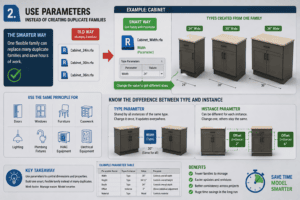
2. Use Parameters Instead of Creating Duplicate Families
One of the biggest time-saving ideas in 10 Powerful Revit Family Tips to Model Faster is using parameters intelligently.
Suppose you need three versions of a cabinet: 24 inches, 30 inches, and 36 inches wide.
Instead of creating three separate families, create one family with a Width parameter.
You can then create different types or control the value as required.
The same principle can be used for:
- Doors
- Windows
- Furniture
- Casework
- Lighting
- Plumbing fixtures
- HVAC equipment
- Electrical equipment
A flexible family can replace several nearly identical files.
This is one of the reasons 10 Powerful Revit Family Tips to Model Faster can have such a significant effect on a BIM workflow.
Know the Difference Between Type and Instance
Use a type parameter when a value should be shared by all instances of that type.
Use an instance parameter when individual placed objects may require different values.
For example, a desk may have a fixed width but a different mounting or offset value depending on where it is placed.
Choosing the correct parameter type from the beginning makes your family easier to use.
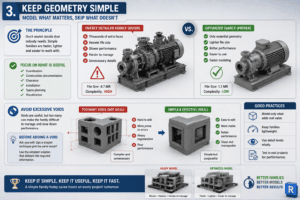
3. Keep Geometry Simple
The third principle in 10 Powerful Revit Family Tips to Model Faster is simple: do not model details that nobody needs.
Many users assume that a detailed family is automatically a better family. In BIM, that is not always true.
A highly detailed manufacturer model may look impressive in 3D, but if you place 500 copies of it in a project, the additional geometry can become unnecessary overhead.
Ask yourself whether a detail is required for:
- Coordination
- Construction documentation
- Clearance
- Installation
- Space planning
- Visualization
If it is not useful, consider leaving it out.
This approach is especially important for large projects and is a core idea behind 10 Powerful Revit Family Tips to Model Faster.
Avoid Excessive Voids
Voids are useful for creating openings and complex forms, but too many voids can make a family difficult to manage.
Before adding a void, consider whether another simpler technique can produce the same result.
The goal is not to make the family as complicated as possible. The goal is to make it useful.
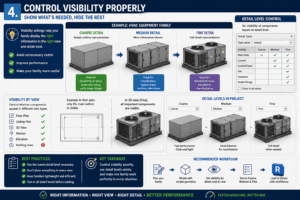
4. Control Visibility Properly
Visibility settings are a powerful part of 10 Powerful Revit Family Tips to Model Faster.
A family does not need to display every component in every view.
For example, an equipment family could show a simple outline at Coarse detail, more information at Medium detail, and additional geometry at Fine detail.
This allows the family to remain useful without displaying unnecessary information everywhere.
Visibility can also be controlled based on whether a component should appear in different views.
Use Coarse, Medium, and Fine Detail Levels
Detail levels are particularly useful for large projects.
A complicated object might need only a simple representation in a general floor plan. A detailed 3D coordination view may require additional geometry.
Using detail levels correctly is an important part of 10 Powerful Revit Family Tips to Model Faster because it allows the same family to serve different purposes.
Always test the family at all relevant detail levels before adding it to your main library.
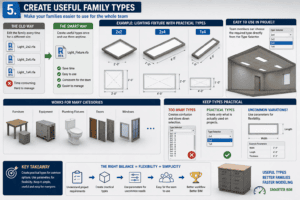
5. Create Useful Family Types
The fifth technique in 10 Powerful Revit Family Tips to Model Faster is creating practical family types.
Imagine a lighting fixture available in three standard sizes.
Instead of editing the family every time, create useful types such as:
- 2×2
- 2×4
- 1×4
The same approach works for furniture, equipment, plumbing fixtures, doors, windows, and other components.
Types make your families easier for other team members to use because they can select the required option directly in the project.
However, do not create a new type for every tiny variation.
Keep Types Practical
Too many types can make a family confusing.
Think about the sizes and configurations that are actually used on projects. Create those first.
For uncommon variations, parameters may provide a better solution.
This balance between flexibility and simplicity is another important part of 10 Powerful Revit Family Tips to Model Faster.
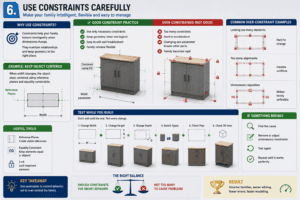
6. Use Constraints Carefully
Constraints can make a family behave intelligently when dimensions change.
For example, you may want an object to remain centered while its width changes. Reference planes and equality constraints can help maintain that relationship.
However, adding constraints everywhere is not necessarily a good idea.
A family with excessive constraints can become difficult to troubleshoot. If changing one parameter causes several unrelated elements to fail, the family may have been over-constrained.
Test While You Build
Do not wait until the family is complete before testing it.
Change the width.
Change the height.
Change the depth.
Switch between types.
Check the plan.
Check the 3D view.
If something breaks, fix it immediately.
This testing habit is one of the simplest recommendations in 10 Powerful Revit Family Tips to Model Faster and can save a great deal of time.
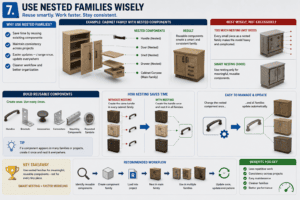
7. Use Nested Families Wisely
Nested families can be extremely useful when an object contains reusable components.
For example, a cabinet may contain doors, handles, shelves, and drawers. If the same handle is used on several cabinet families, creating the handle once and nesting it can save repetitive work.
Nested families can also help maintain consistency across a project.
However, nesting should be used for a reason.
If every small piece becomes a separate nested family, the overall family may become unnecessarily complicated.
Build Reusable Components
Think about components that you use repeatedly.
Common examples include:
- Handles
- Brackets
- Accessories
- Connectors
- Mounting components
- Repeated symbols
If a component appears in many families, creating it once may save substantial time later.
This is another practical application of 10 Powerful Revit Family Tips to Model Faster.
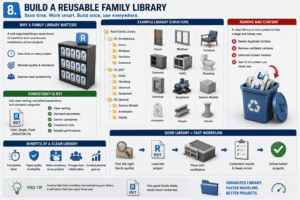
8. Build a Reusable Family Library
A clean Revit family library can become one of your most valuable productivity tools.
This is why creating a family library is a major part of 10 Powerful Revit Family Tips to Model Faster.
Instead of rebuilding common content for every project, keep reliable families in an organized location.
For example:
Architecture
- Doors
- Windows
- Furniture
- Casework
MEP
- HVAC
- Plumbing
- Electrical
- Equipment
General
- Generic Models
- Annotation
- Details
The exact structure does not matter as much as consistency.
Remove Bad Content
Do not keep every family you have downloaded.
Delete duplicates, outdated versions, broken families, and content that you never use.
A smaller library containing dependable families is usually much more useful than thousands of random files.
A clean library makes finding the right family much faster and reinforces the principles of 10 Powerful Revit Family Tips to Model Faster.
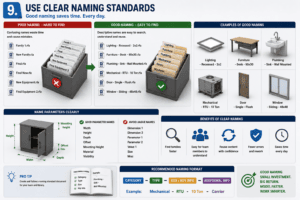
9. Use Clear Naming Standards
Naming is often overlooked, but it can save time every day.
Imagine a library containing files called:
- Family 1
- New Family
- Final
- Final New
- New Equipment
- Final Equipment 2
Finding the correct file becomes difficult.
Instead, use descriptive names.
For example:
- Lighting – Recessed – 2×2
- Furniture – Desk – 60×30
- Plumbing – Sink – Wall Mounted
- Mechanical – RTU – 10 Ton
A consistent naming standard makes content easier to search and easier for other BIM modelers to understand.
Name Parameters Clearly
The same rule applies inside the family.
Use names such as:
- Width
- Height
- Depth
- Offset
- Mounting Height
- Material
- Visibility
Avoid vague names such as Dimension 1 or Parameter 2.
Good naming is a small investment that pays off repeatedly and supports the overall workflow described in 10 Powerful Revit Family Tips to Model Faster.
10. Test and Optimize Before Sharing
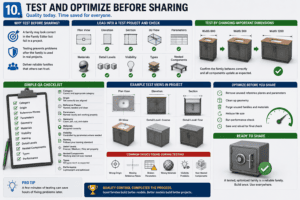
The final technique in 10 Powerful Revit Family Tips to Model Faster is quality control.
A family is not finished simply because it looks correct in the Family Editor.
Load it into a test project and check:
- Plan view
- Elevation
- Section
- 3D view
- Parameters
- Materials
- Detail levels
- Visibility
- Types
- Nested components
Change important dimensions and confirm that the family behaves correctly.
This final test can prevent a bad family from being used throughout an entire project.
Create a Simple QA Process
If you create families regularly, make a basic checklist.
Check the category, origin, reference planes, parameters, geometry, materials, visibility, naming, and detail levels.
A repeatable QA process makes it much easier to maintain a professional family library.
This final quality-control step completes the practical approach behind 10 Powerful Revit Family Tips to Model Faster.
How These Techniques Save Real Modeling Time
The real benefit of 10 Powerful Revit Family Tips to Model Faster is not necessarily the time you save while creating one family.
The bigger benefit comes from reuse.
Imagine you have 300 lighting fixtures in a project. If your family is already configured correctly, you can load it, choose the appropriate type, place the fixtures, and continue with your work.
Now imagine having to manually model or modify each fixture.
The difference can be enormous.
The same principle applies to MEP equipment, furniture, doors, windows, casework, plumbing fixtures, and many other Revit elements.
Experienced BIM modelers often become faster not because they draw every object more quickly, but because they have already created reliable content that can be reused.
That is the real productivity advantage offered by 10 Powerful Revit Family Tips to Model Faster.
Common Revit Family Mistakes to Avoid
While applying 10 Powerful Revit Family Tips to Model Faster, it is equally important to recognize mistakes that can slow you down.
Modeling Too Much Detail
Avoid unnecessary geometry. Detail should have a purpose.
Creating Too Many Separate Families
If several versions can be controlled through parameters, consider using one flexible family.
Ignoring Plan Representation
A family that looks excellent in 3D may still be poor for documentation if its plan representation is incorrect.
Not Testing Parameters
Always change important dimensions before considering a family finished.
Keeping an Unorganized Library
A family library full of duplicates and outdated content can become a source of wasted time.
Avoiding these problems is just as important as following the techniques in 10 Powerful Revit Family Tips to Model Faster.
Tips for Beginners Learning Revit Families
If you are new to Revit families, do not try to learn everything at once.
Start with simple families.
Create a basic piece of furniture. Add reference planes. Add dimensions. Create a parameter. Test it. Then gradually introduce materials, visibility controls, types, and nested components.
Following the ideas in 10 Powerful Revit Family Tips to Model Faster becomes much easier when you understand why each feature exists.
Do not focus only on making a family look good.
Focus on making it behave correctly.
That difference is extremely important.
A beginner who learns good family habits early can avoid many of the problems that experienced modelers encounter when maintaining large libraries.
How Experienced BIM Modelers Can Improve Further
Experienced users can take the principles of 10 Powerful Revit Family Tips to Model Faster a step further by creating standards for their entire team.
For example, a company can establish:
- Family naming standards
- Parameter naming standards
- Folder structures
- Detail-level rules
- Shared parameters
- QA procedures
- Approved family templates
- Library maintenance procedures
This creates consistency across projects.
Instead of every modeler creating families differently, everyone follows the same basic system.
The result is easier collaboration and less time spent fixing inconsistent content.
Create a Family Once and Reuse It
The central idea behind 10 Powerful Revit Family Tips to Model Faster is very simple.
Do not think of a family as something you create only for today’s project.
Think about how it can help you tomorrow.
If you build a flexible furniture family today and use it on five future projects, the original time investment becomes much more valuable.
The same applies to HVAC equipment, plumbing fixtures, electrical components, lighting, doors, windows, and casework.
Every good family you create becomes another tool in your BIM toolbox.
Final Thoughts
Learning 10 Powerful Revit Family Tips to Model Faster can improve much more than your Family Editor skills. It can change the way you approach your entire Revit workflow.
Plan your families before modeling. Build a strong reference framework. Use parameters instead of unnecessary duplicate families. Keep geometry lightweight. Control visibility and detail levels. Create practical types. Use constraints carefully. Nest components when there is a genuine benefit. Maintain a clean library and use consistent naming.
Most importantly, test your families before sharing them.
The goal is not to create the most complicated family possible. The goal is to create a family that is reliable, flexible, lightweight, and reusable.
When you start building families with that mindset, repetitive modeling becomes much less of a problem.
For architects, engineers, BIM modelers, contractors, interior designers, and Revit students, these habits can provide benefits across almost every project.
The best Revit workflow is not necessarily the one where you model fastest today. It is the one where the work you do today makes tomorrow’s modeling faster.
That is the real value of 10 Powerful Revit Family Tips to Model Faster.
For more information click here.