5 Powerful Electrical Revit Families (part1)
Are you looking to improve your electrical modeling skills and create professional commercial building projects in Autodesk Revit? The right Revit families can help you work faster, maintain consistent drawings, and improve coordination between electrical, architectural, structural, and mechanical systems.
In this guide, 5 Powerful Electrical Revit Families (part1) explores five essential categories of electrical components that every Revit modeler and BIM professional should understand. Whether you work on offices, shopping centers, restaurants, warehouses, retail stores, or other commercial buildings, these families can help improve your daily workflow.
If you are building your own Revit family library, this guide will help you understand which components to prioritize, how to use them, and what to check before adding them to a project.
At RevitFamiliesHub, we aim to help Revit users discover useful BIM resources, learn practical modeling techniques, and build better project workflows.
Why Electrical Revit Families Are Important for Commercial Projects
Electrical Revit families represent reusable electrical devices and equipment within a Building Information Modeling (BIM) environment. Depending on their configuration, they can include geometry, dimensions, parameters, electrical connectors, and manufacturer information.
The main advantage of using suitable families is consistency. Instead of creating similar components repeatedly, you can load existing content and use it across multiple projects.
For professionals exploring 5 Powerful Electrical Revit Families (part1), understanding these benefits is the first step toward creating a more efficient BIM workflow.
Well-organized electrical families can help you:
- Save time during electrical modeling.
- Maintain consistent symbols and component representations.
- Improve electrical floor plans and construction documentation.
- Support circuit assignments and panel schedules when configured correctly.
- Coordinate equipment with architectural and mechanical elements.
- Create schedules and manage equipment information more efficiently.
For commercial projects, always select families that meet the design requirements rather than choosing components based only on appearance.
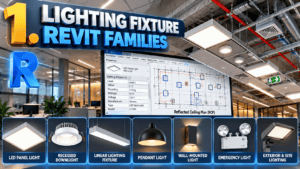
1. Lighting Fixture Revit Families
Why Lighting Fixtures Are Essential
Lighting fixtures are among the most frequently used electrical components in commercial buildings. They appear in offices, corridors, meeting rooms, retail spaces, restaurants, warehouses, and many other areas.
When exploring 5 Powerful Electrical Revit Families (part1), lighting fixtures are an excellent starting point because they directly affect reflected ceiling plans and electrical documentation.
Common lighting fixture types include:
- LED panel lights
- Recessed downlights
- Linear lighting fixtures
- Pendant lights
- Wall-mounted lights
- Emergency lighting fixtures
- Exterior and site lighting
A properly configured lighting family may contain fixture dimensions, mounting information, manufacturer details, and lighting-related parameters. Some families also include photometric data for lighting analysis.
How to Use Lighting Families in Revit
To place a lighting fixture, load the required family into your project and select the appropriate placement method. Position the fixture according to the electrical design and coordinate it with the reflected ceiling plan (RCP).
Check ceiling grids, beams, HVAC diffusers, sprinkler heads, and other ceiling-mounted equipment to reduce coordination conflicts.
For commercial projects, use suitable fixture types for offices, restrooms, corridors, storage areas, and exterior spaces.
Pro tip: Avoid loading unnecessary lighting families. Keep only the types required for your project to maintain an organized model.
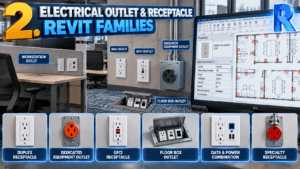
2. Electrical Outlet and Receptacle Revit Families
Common Types of Electrical Outlets
Electrical outlets, also called receptacles, represent connection points for equipment and appliances. They are commonly installed on walls, floors, workstations, and designated equipment locations.
The second category in 5 Powerful Electrical Revit Families (part1) is especially useful for commercial spaces where outlet placement must coordinate with furniture and equipment layouts.
Common outlet types include:
- Duplex receptacles
- Dedicated equipment outlets
- GFCI receptacles
- Floor box outlets
- Data and power combination devices
- Specialty receptacles for commercial equipment
Outlet requirements depend on the building’s intended use, the electrical design, and applicable codes.
Benefits of Using Outlet Families
Outlet families help communicate device locations clearly on electrical plans. Depending on their configuration, they may include mounting height, device type, identification, and other project parameters.
For example, a commercial office may require receptacles near workstations, printers, conference tables, displays, and dedicated equipment.
When applying 5 Powerful Electrical Revit Families (part1) to your workflow, remember that consistent naming and clear device annotations can make drawings easier to understand.
Review outlet positions against furniture layouts, interior elevations, and equipment requirements before completing the model.
Pro tip: Verify mounting heights and electrical requirements using the project documents. Do not assume that every receptacle should have the same mounting height or circuit configuration.
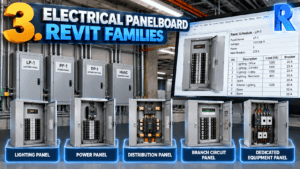
3. Electrical Panelboard Revit Families
What Are Electrical Panelboard Families?
Panelboards are essential components of commercial electrical distribution systems. They represent equipment used to distribute electrical power to branch circuits and connected loads.
For BIM professionals studying 5 Powerful Electrical Revit Families (part1), panelboard families deserve special attention because their functionality can affect electrical schedules and circuit documentation.
Typical panelboard categories include:
- Lighting panels
- Power panels
- Distribution panels
- Branch circuit panels
- Dedicated equipment panels
A useful panelboard family can contain dimensions, mounting information, equipment identification, and electrical parameters.
How Panelboards Improve Electrical Documentation
Correctly configured electrical equipment can support circuit assignment, load information, and panel schedule creation in Revit.
For example, a commercial retail project may use separate panels for lighting, receptacles, HVAC equipment, and other loads, depending on the engineer’s design.
When selecting families for 5 Powerful Electrical Revit Families (part1), remember that a realistic 3D appearance does not guarantee electrical functionality. Verify the electrical connectors, distribution system settings, and other relevant parameters.
Also check equipment dimensions and required access clearances against the project documentation.
Pro tip: Use consistent panel names and identification parameters to improve coordination between electrical plans, equipment schedules, and panel schedules.
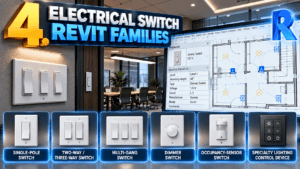
4. Electrical Switch Revit Families
Types of Electrical Switches
Electrical switches represent devices used to control lighting and other electrical systems. They are common in offices, meeting rooms, retail stores, corridors, and service spaces.
Another important category in 5 Powerful Electrical Revit Families (part1) is switch families, which help communicate the intended locations of lighting controls.
Common switch types include:
- Single-pole switches
- Two-way or three-way switching devices, depending on regional terminology
- Multi-gang switches
- Dimmer switches
- Occupancy-sensor switches
- Specialty lighting control devices
Always follow the naming conventions and electrical standards specified for your project.
Best Practices for Switch Placement
Switch placement should reflect the intended control arrangement and architectural layout. Coordinate switches with doors, circulation paths, accessibility requirements, and room functions.
For example, conference rooms and larger commercial spaces may require more complex lighting control arrangements than small storage rooms.
When using 5 Powerful Electrical Revit Families (part1) as a learning resource, remember that placing a switch symbol does not automatically establish the correct lighting control circuit. Verify the intended relationships between switches, fixtures, sensors, and control systems.
Pro tip: Maintain consistent switch types and annotations. Clear documentation helps contractors and other project team members understand the design.
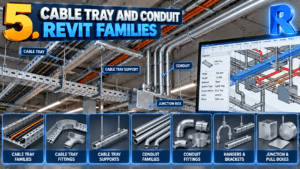
5. Cable Tray and Conduit Revit Families
Understanding Cable Trays and Conduits
Cable trays and conduits are important components of electrical routing and distribution. Revit includes native system elements for cable trays and conduits, while additional families can represent accessories, supports, fittings, and specialized equipment.
The fifth category in 5 Powerful Electrical Revit Families (part1) focuses on components that help represent electrical infrastructure in coordinated commercial models.
Common components include:
- Cable tray fittings
- Conduit fittings
- Cable tray supports
- Hangers and brackets
- Junction and pull boxes
- Project-specific routing accessories
These elements help communicate routing requirements and coordinate electrical systems with other building services.
How to Improve Electrical Routing Coordination
Commercial electrical routing often needs to coordinate with HVAC ducts, plumbing pipes, structural beams, ceilings, and architectural elements.
Use appropriate Revit system elements for actual routing wherever possible. Add compatible families when required for accessories, supports, or project-specific components.
Before completing the model, check routing elevations, clearances, support locations, and equipment access requirements.
Professionals applying 5 Powerful Electrical Revit Families (part1) should also consider the level of detail needed for each project stage.
Pro tip: Avoid excessive geometric detail when it does not improve coordination or documentation. Appropriate detail levels can help maintain model performance.
How to Choose the Best Electrical Revit Families
Selecting a family involves more than finding an attractive 3D component. When applying 5 Powerful Electrical Revit Families (part1) to a real project, review compatibility, parameters, functionality, and file performance before committing to a family library.
1. Check Revit Version Compatibility
Confirm that the family works with your Revit version. Test downloaded content in a sample project before using it in a production model.
2. Review Family Parameters
Check dimensions, type parameters, instance parameters, connectors, and naming conventions where relevant. Electrical connectors are particularly important when circuiting and scheduling functionality is required.
3. Consider File Size and Performance
Overly detailed geometry and unnecessary nested families can increase model complexity. Select content with a level of detail appropriate for the project.
4. Verify Manufacturer Information
For manufacturer-specific equipment, compare family dimensions and technical data with the manufacturer’s documentation. Generic families should not be assumed to represent a particular product accurately.
5. Test Families Before Project Use
Load each family into a test project and verify placement, visibility, scheduling, connectors, and other required functions. Testing can help identify problems before the content is used in a live project.
Where to Find Electrical Revit Families
Finding reliable BIM content can take time, especially when working with commercial project specifications and tight deadlines.
You can explore manufacturer BIM libraries, established Revit content libraries, and trusted BIM resource websites. Check file compatibility, licensing terms, family quality, and the accuracy of supplied information before using downloaded content.
For professionals implementing 5 Powerful Electrical Revit Families (part1) in their workflow, maintaining a structured family library is another practical way to save time.
Organize content into folders such as Lighting, Electrical Devices, Panelboards, Switches, and Cable Tray Accessories. Use clear file names so you can find the correct component quickly.
Explore RevitFamiliesHub for useful Revit resources, family collections, and practical BIM modeling guides that can support your next project.
Conclusion
Choosing the right electrical families can make commercial Revit projects more consistent, organized, and easier to document. 5 Powerful Electrical Revit Families (part1) provides a useful starting point for BIM professionals who want to improve their electrical modeling workflow.
In 5 Powerful Electrical Revit Families (part1), we explored five essential categories: lighting fixtures, electrical outlets, panelboards, switches, and cable tray or conduit components. Each category plays an important role in electrical design and BIM coordination.
By applying the techniques discussed in 5 Powerful Electrical Revit Families (part1), you can select compatible families, review parameters, and improve the quality of your electrical models.
If you are a Revit modeler, electrical designer, or BIM professional, 5 Powerful Electrical Revit Families (part1) can help you identify the components worth including in your reusable family library.
Building on the ideas in 5 Powerful Electrical Revit Families (part1) can also help reduce repetitive modeling tasks and maintain consistency across commercial projects.
For more practical BIM tips, explore 5 Powerful Electrical Revit Families (part1) and discover how the right electrical content can support your daily Revit work.
Ready to improve your electrical BIM workflow? Use 5 Powerful Electrical Revit Families (part1) as your starting point, and visit RevitFamiliesHub for more Revit resources, family collections, and practical modeling guides.
Frequently Asked Questions
What are electrical Revit families?
Electrical Revit families are reusable BIM components that represent electrical devices and equipment, including lights, receptacles, switches, and panels.
Can electrical Revit families support panel schedules?
Yes. Appropriately configured electrical equipment and circuit-connected elements can support panel schedules. Functionality depends on family configuration and project settings.
Are all electrical Revit families compatible with every Revit version?
No. Compatibility varies by family content and version-specific features. Test downloaded families before using them in a live project.
What should I check before downloading a Revit family?
Review compatibility, geometry, parameters, connectors, file size, licensing, and manufacturer information where applicable.
What will Part 2 cover?
Part 2 can explore transformers, junction boxes, electrical disconnects, emergency lighting equipment, and additional electrical distribution accessories to help expand your commercial BIM library.
for more information click here.