5 Powerful Revit Tips for Big Models
Large Revit projects can become difficult to manage when files start lagging, synchronization becomes slow, and opening views takes too much time. Many BIM professionals working on commercial towers, hospitals, airports, and residential developments face these challenges daily. The good news is that proper workflow management can dramatically improve performance. These 5 Powerful Revit Tips for Big Models can help architects, BIM modelers, and engineers work faster and more efficiently.
If you are struggling with slow projects, crashes, or heavy models, these 5 Powerful Revit Tips for Big Models will help you optimize your workflow and maintain better project performance.

Why Large Revit Models Become Slow
Before applying the 5 Powerful Revit Tips for Big Models, it is important to understand why large Revit projects become heavy. Revit models often contain thousands of elements, linked files, detailed families, imported CAD drawings, schedules, and annotations. As the project grows, performance naturally decreases if the model is not managed properly.
Common reasons for slow performance include:
- Heavy Revit families
- Excessive imported CAD files
- Poor workset organization
- Too many open views
- High-detail geometry
- Large linked models
- Thousands of project warnings
Understanding these problems is the first step toward implementing the 5 Powerful Revit Tips for Big Models successfully.
Tip 1 – Use Lightweight Families
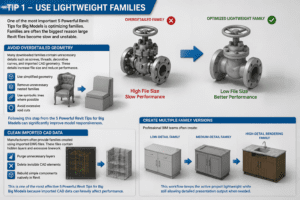
One of the most important 5 Powerful Revit Tips for Big Models is optimizing families. Families are often the biggest reason large Revit files become slow and unstable.
Avoid Overdetailed Geometry
Many downloaded families contain unnecessary details such as screws, threads, decorative curves, and imported CAD geometry. These details increase file size and reduce performance.
Instead:
- Use simplified geometry
- Remove unnecessary nested families
- Use symbolic lines where possible
- Avoid excessive void cuts
Following this step from the 5 Powerful Revit Tips for Big Models can significantly improve model responsiveness.
Clean Imported CAD Data
Manufacturers often provide families created using imported DWG files. These files contain hidden layers and excessive linework.
Always:
- Purge unnecessary layers
- Delete invisible CAD elements
- Rebuild simple components natively in Revit
This is one of the most effective 5 Powerful Revit Tips for Big Models because imported CAD data can heavily affect performance.
Create Multiple Family Versions
Professional BIM teams often create:
- Low-detail families
- Medium-detail families
- High-detail rendering families
This workflow keeps the active project lightweight while still allowing detailed presentation output when needed.
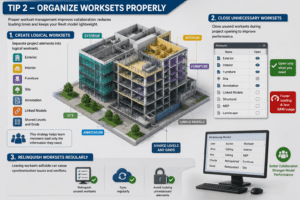
Tip 2 – Organize Worksets Properly
Another essential point in the 5 Powerful Revit Tips for Big Models is proper workset management. Poorly organized worksets can slow down collaboration and increase loading times.
Create Logical Worksets
Instead of placing everything into one workset, separate project elements properly.
Examples include:
- Exterior
- Interior
- Furniture
- Site
- Annotation
- Linked Models
- Shared Levels and Grids
This strategy from the 5 Powerful Revit Tips for Big Models helps team members load only the information they need.
Close Unnecessary Worksets
One of the easiest ways to improve Revit speed is closing unused worksets during project opening.
For example:
- Interior designers may not need structural worksets
- Architects may temporarily close landscape elements
- MEP users may unload unnecessary architectural details
This method from the 5 Powerful Revit Tips for Big Models reduces RAM usage and improves project loading speed.
Relinquish Worksets Regularly
Leaving worksets editable creates synchronization problems and central file conflicts.
Always:
- Relinquish unused worksets
- Sync regularly
- Avoid locking unnecessary elements
Good collaboration habits are a major part of the 5 Powerful Revit Tips for Big Models.
Tip 3 – Optimize Linked Models
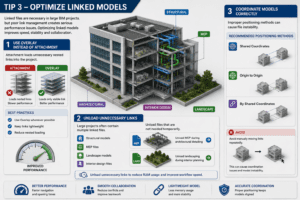
Linked files are necessary in large BIM projects, but poor link management creates serious performance issues. That is why linked model optimization is included in these 5 Powerful Revit Tips for Big Models.
Use Overlay Instead of Attachment
Using “Attachment” can load unnecessary nested links into the project.
Instead:
- Use Overlay whenever possible
- Keep links lightweight
- Reduce nested loading
This simple adjustment from the 5 Powerful Revit Tips for Big Models can noticeably improve model performance.
Unload Unnecessary Links
Large projects often contain:
- Structural models
- MEP files
- Landscape models
- Interior design files
Unload files that are not needed temporarily.
For example:
- Unload MEP during architectural detailing
- Unload landscaping during interior planning
This approach is one of the smartest 5 Powerful Revit Tips for Big Models for improving workflow speed.
Coordinate Models Correctly
Improper positioning methods can cause file instability.
Recommended positioning methods include:
- Shared Coordinates
- Origin to Origin
- By Shared Coordinates
Avoid manually moving links repeatedly.
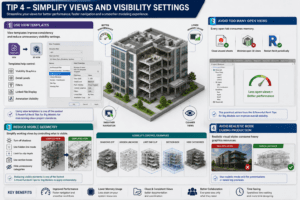
Tip 4 – Simplify Views and Visibility Settings
One of the most overlooked 5 Powerful Revit Tips for Big Models is view optimization. Heavy views consume significant system resources.
Use View Templates
View templates improve consistency and reduce unnecessary visibility settings.
Templates help control:
- Visibility Graphics
- Detail Levels
- Filters
- Linked File Display
- Annotation Visibility
Using view templates is one of the easiest 5 Powerful Revit Tips for Big Models for maintaining clean project standards.
Avoid Too Many Open Views
Every open tab consumes memory.
Best practice includes:
- Close unused sheets
- Minimize open 3D views
- Restart Revit periodically
This practical advice from the 5 Powerful Revit Tips for Big Models can improve overall stability.
Reduce Visible Geometry
Simplify working views by:
- Turning off shadows
- Using hidden line mode
- Limiting far clip depth
- Using section boxes
- Hiding unnecessary categories
Reducing visible elements is one of the fastest 5 Powerful Revit Tips for Big Models to apply immediately.
Avoid Realistic Mode During Production
Realistic visual styles consume heavy graphics resources. Use them only for presentations or rendering previews.
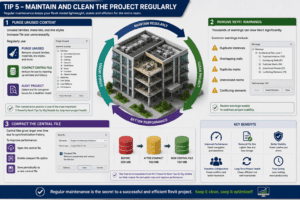
Tip 5 – Maintain and Clean the Project Regularly
The final point in these 5 Powerful Revit Tips for Big Models is regular project maintenance. Even well-structured projects become bloated over time.
Purge Unused Content
Unused families, materials, and line styles increase file size unnecessarily.
Regularly use:
- Purge Unused
- Compact Central File
- Audit Project
This maintenance process is one of the most important 5 Powerful Revit Tips for Big Models for long-term project health.
Remove Revit Warnings
Thousands of warnings can slow Revit significantly.
Common warnings include:
- Duplicate instances
- Overlapping walls
- Duplicate marks
- Unenclosed rooms
- Conflicting elements
Review warnings weekly to maintain project stability.
Compact the Central File
Central files grow larger over time due to synchronization history.
To improve performance:
- Open the central file
- Enable compact file option
- Save periodically as a new central file
This final recommendation from the 5 Powerful Revit Tips for Big Models can help reduce file corruption risks.
Bonus Performance Tips for Large Revit Projects
Besides the main 5 Powerful Revit Tips for Big Models, there are several additional techniques that improve workflow performance.
Upgrade Hardware
Large BIM projects require strong hardware.
Recommended specifications include:
- Fast SSD storage
- High single-core CPU speed
- Dedicated graphics card
- Minimum 32GB RAM
Good hardware supports all 5 Powerful Revit Tips for Big Models more effectively.
Limit Imported CAD Files
Instead of importing DWGs permanently:
- Link CAD files temporarily
- Clean drawings before import
- Remove unused layers
CAD imports are one of the hidden reasons projects become slow.
Keep Revit Updated
New updates improve:
- Stability
- Graphics performance
- Synchronization
- Memory management
Updated software works better alongside the 5 Powerful Revit Tips for Big Models.
Common Mistakes That Slow Down Big Revit Models
Even experienced users sometimes create bad habits that affect performance.
Avoid these mistakes:
- Modeling everything in high detail
- Keeping all links loaded
- Ignoring project warnings
- Using excessive imported CAD files
- Creating duplicate views
- Leaving unused groups inside the model
Avoiding these mistakes will help you fully benefit from the 5 Powerful Revit Tips for Big Models.
Final Thoughts on 5 Powerful Revit Tips for Big Models
Managing large BIM projects requires more than just a powerful computer. Smart workflow strategies are essential for maintaining speed, stability, and productivity. These 5 Powerful Revit Tips for Big Models can help reduce lag, improve synchronization times, and create a smoother working environment for the entire BIM team.
By optimizing families, organizing worksets, managing linked models, simplifying views, and maintaining the project regularly, users can keep even massive Revit projects running efficiently.
If you consistently apply these 5 Powerful Revit Tips for Big Models, you will notice major improvements in project performance, team collaboration, and overall workflow efficiency.
For more information click here